IBKR Flex Query into Google Sheets, Excel or Python
A Flex Query needs two calls: SendRequest returns a reference code, then GetStatement returns the statement, per IBKR's Flex Web Service docs. A short script does both; IMPORTXML cannot.
Checked Not affiliated with Interactive Brokers.
| Where | How | Refresh |
|---|---|---|
| Python | HowThe script below | RefreshEach run |
| Google Sheets | HowApps Script, into an IBKR tab | RefreshRun, or a time-driven trigger |
| Excel | HowThe script's CSV, via Data > From Text/CSV | RefreshRun it, then Refresh All |
| By hand | HowThe blue Run arrow beside the query in Client Portal | RefreshEach time |
First get a token and a Query ID, for an XML query with Open Positions. Both scripts retry while IBKR answers 1019.
Python
Set IBKR_FLEX_TOKEN and IBKR_FLEX_QUERY_ID, pip install requests pandas, and run it. It writes ibkr_positions.csv.
ibkr_flex.py44 lines
import os
import time
import xml.etree.ElementTree as ET

import pandas as pd
import requests

BASE = "https://ndcdyn.interactivebrokers.com/AccountManagement/FlexWebService"
TOKEN = os.environ["IBKR_FLEX_TOKEN"]
QUERY_ID = os.environ["IBKR_FLEX_QUERY_ID"]


def call(endpoint, q):
    reply = requests.get(
        f"{BASE}/{endpoint}",
        params={"t": TOKEN, "q": q, "v": "3"},
        headers={"User-Agent": "Python/3"},
        timeout=60,
    )
    reply.raise_for_status()
    return ET.fromstring(reply.content)


def fail(reply):
    raise SystemExit(f"{reply.findtext('ErrorCode')}: {reply.findtext('ErrorMessage')}")


sent = call("SendRequest", QUERY_ID)
if sent.findtext("Status") != "Success":
    fail(sent)

for _ in range(20):
    time.sleep(10)  # 1019 means the statement is still being built
    statement = call("GetStatement", sent.findtext("ReferenceCode"))
    if statement.tag == "FlexQueryResponse":
        break
    if statement.findtext("ErrorCode") != "1019":
        fail(statement)
else:
    raise SystemExit("The statement was not ready after 200 seconds")

positions = pd.DataFrame([row.attrib for row in statement.iter("OpenPosition")])
positions.to_csv("ibkr_positions.csv", index=False)
print(positions)
Google Sheets
Paste it in Extensions > Apps Script, add both values under Project Settings > Script Properties, and run importIbkrPositions. Editors of the sheet can read the token, so keep it private.
ibkr_flex.gs45 lines
const BASE = "https://ndcdyn.interactivebrokers.com/AccountManagement/FlexWebService";

function flexCall(endpoint, q) {
  const token = PropertiesService.getScriptProperties().getProperty("IBKR_FLEX_TOKEN");
  const url = `${BASE}/${endpoint}?t=${encodeURIComponent(token)}&q=${encodeURIComponent(q)}&v=3`;
  return XmlService.parse(UrlFetchApp.fetch(url).getContentText()).getRootElement();
}

function fail(reply) {
  throw new Error(`${reply.getChildText("ErrorCode")}: ${reply.getChildText("ErrorMessage")}`);
}

function importIbkrPositions() {
  const queryId = PropertiesService.getScriptProperties().getProperty("IBKR_FLEX_QUERY_ID");
  const sent = flexCall("SendRequest", queryId);
  if (sent.getChildText("Status") !== "Success") fail(sent);

  let statement;
  for (let attempt = 0; attempt < 20; attempt++) {
    Utilities.sleep(10000); // 1019 means the statement is still being built
    statement = flexCall("GetStatement", sent.getChildText("ReferenceCode"));
    if (statement.getName() === "FlexQueryResponse") break;
    if (statement.getChildText("ErrorCode") !== "1019") fail(statement);
  }
  if (statement.getName() !== "FlexQueryResponse") throw new Error("Not ready after 200 seconds");

  const rows = [];
  for (const account of statement.getChild("FlexStatements").getChildren("FlexStatement")) {
    const open = account.getChild("OpenPositions");
    if (open) rows.push(...open.getChildren("OpenPosition"));
  }
  if (rows.length === 0) return;
  const header = rows[0].getAttributes().map((attribute) => attribute.getName());
  const values = rows.map((row) =>
    header.map((name) => {
      const value = row.getAttribute(name)?.getValue() ?? "";
      return value !== "" && !isNaN(value) ? Number(value) : value;
    }),
  );

  const book = SpreadsheetApp.getActive();
  const sheet = book.getSheetByName("IBKR") ?? book.insertSheet("IBKR");
  sheet.clearContents();
  sheet.getRange(1, 1, values.length + 1, header.length).setValues([header, ...values]);
}
Errors you will meet6 rows
| Code | Means | Fix |
|---|---|---|
| 1012 | MeansToken has expired. | FixGenerate a new token |
| 1013 | MeansIP restriction. | FixCall from the token's IP address, or make a token without one |
| 1014 | MeansQuery is invalid. | FixThe Query ID from the info icon |
| 1015 | MeansToken is invalid. | FixThe Current Token, not an older one |
| 1018 | MeansToo many requests have been made from this token. | FixOne call a second, 10 a minute |
| 1019 | MeansStatement generation in progress. | FixBoth scripts wait and retry |
The full list is on the setup page.
Where Gloom fits
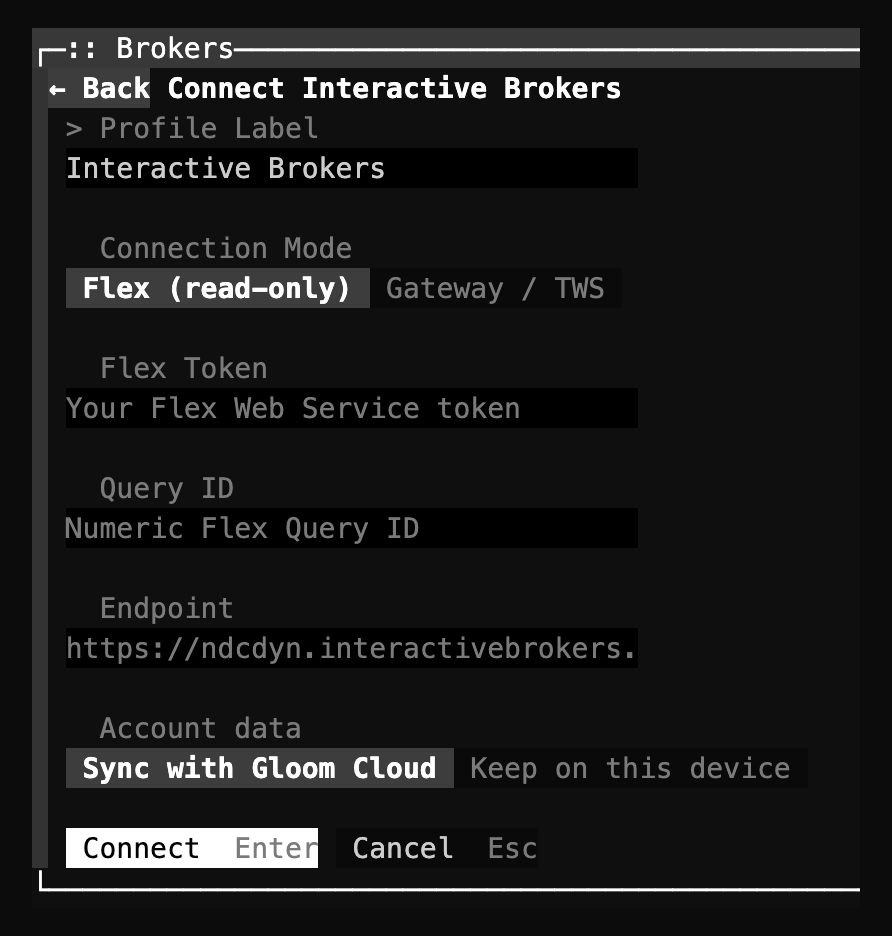
Gloom's Interactive Brokers plugin makes the same two calls and shows the statement as a portfolio.
Gloom covers
- Positions, cost, unrealized P&L, cash and account value.
- Quotes, charts and filings for each holding.
- Prices in your sheet through the Sheets add-on, on Pro.
Gloom does not cover
- Writing the statement to a sheet or a file.
- The browser version: Flex needs the app or the terminal.
Sources5 sources
- IBKR's Flex Web Service docs, read 5 November 2026: introduction, Generate a Report, Retrieve the Report and error codes.
- Create an Activity Flex Query, IBKR's Client Portal guide, updated 23 September 2026: the Format choices (XML, CSV, Text (Pipe), Text (Tab)). Run a Flex Query, updated 9 April 2026: the Run arrow and saving the file.
- Configure Flex Web Service, updated 17 June 2026: the User-Agent header and the token's IP restriction.
- Both scripts ran on 5 November 2026 against a local stand-in that answers like the replies IBKR documents and like two real calls with an invalid token (
1015,Token is invalid.), including one1019before the statement. - Gloom's Google Sheets add-on and the Interactive Brokers plugin source, v1.1.0.
Not verified3 claims
- Either script against a real IBKR account. There was none to test with; the stand-in follows IBKR's documented replies.
- Which address Google's servers call from, if the token has an IP restriction.
- An Excel Power Query that makes both calls. None was tested, so the Excel route goes through the CSV.