Changelog
Page 2 of 5
0.16
Oct 7–12, 2026
Supply chain maps, a live heat map, and assistants that drive the terminal
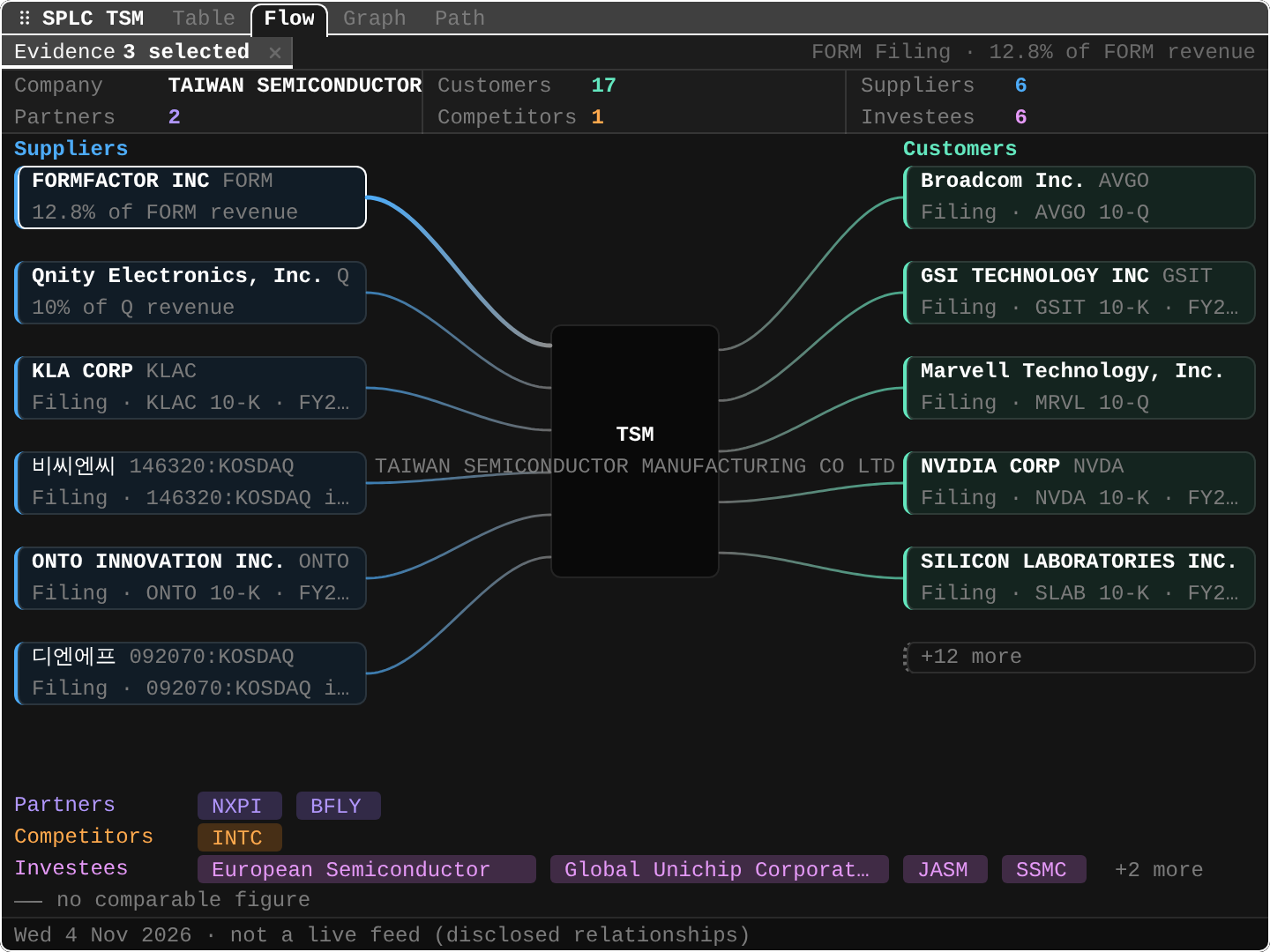
SPLCsupply chain.Who a company sells to and buys from, with each link's share of revenue.
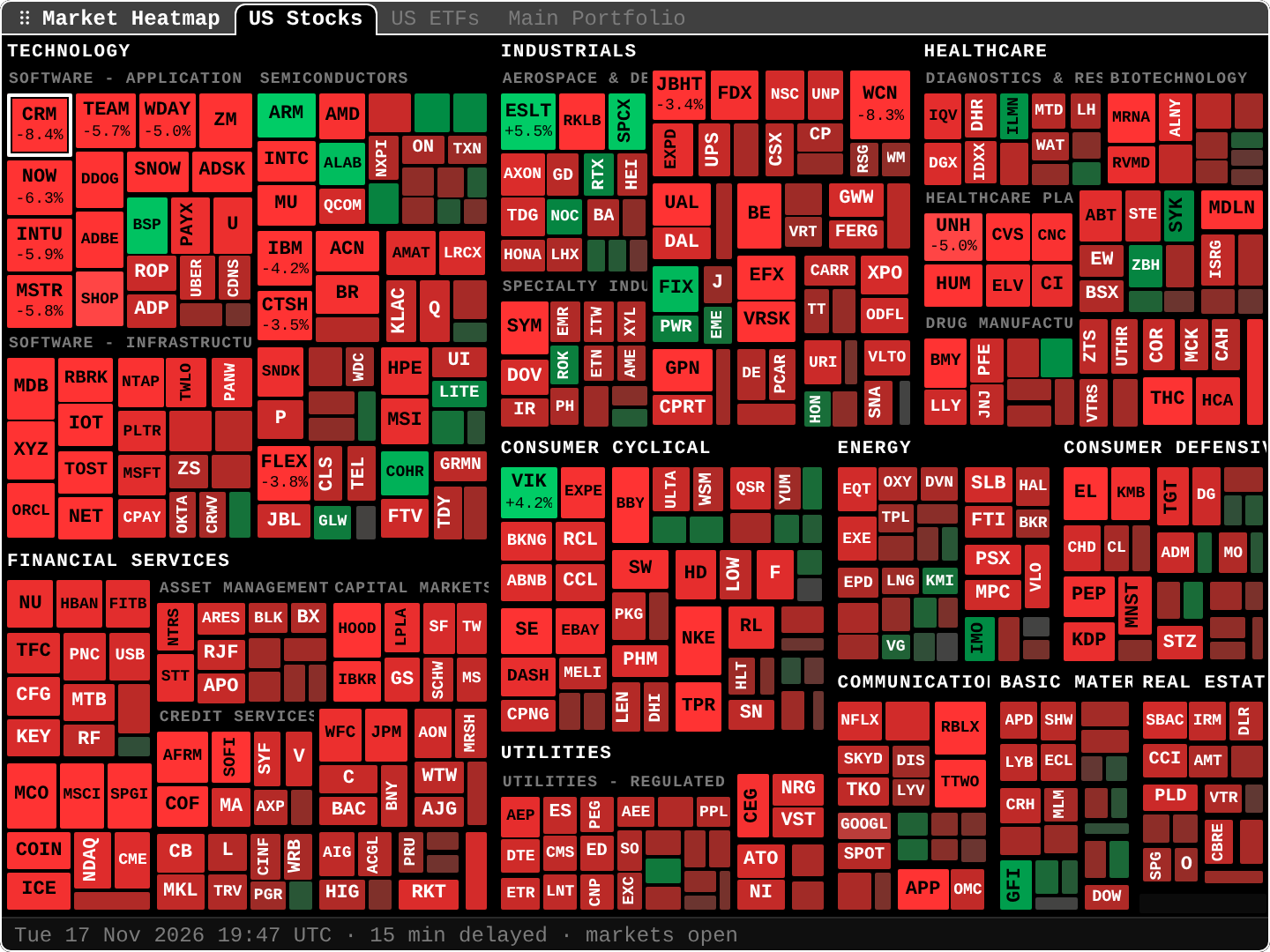
A heat map that moves.
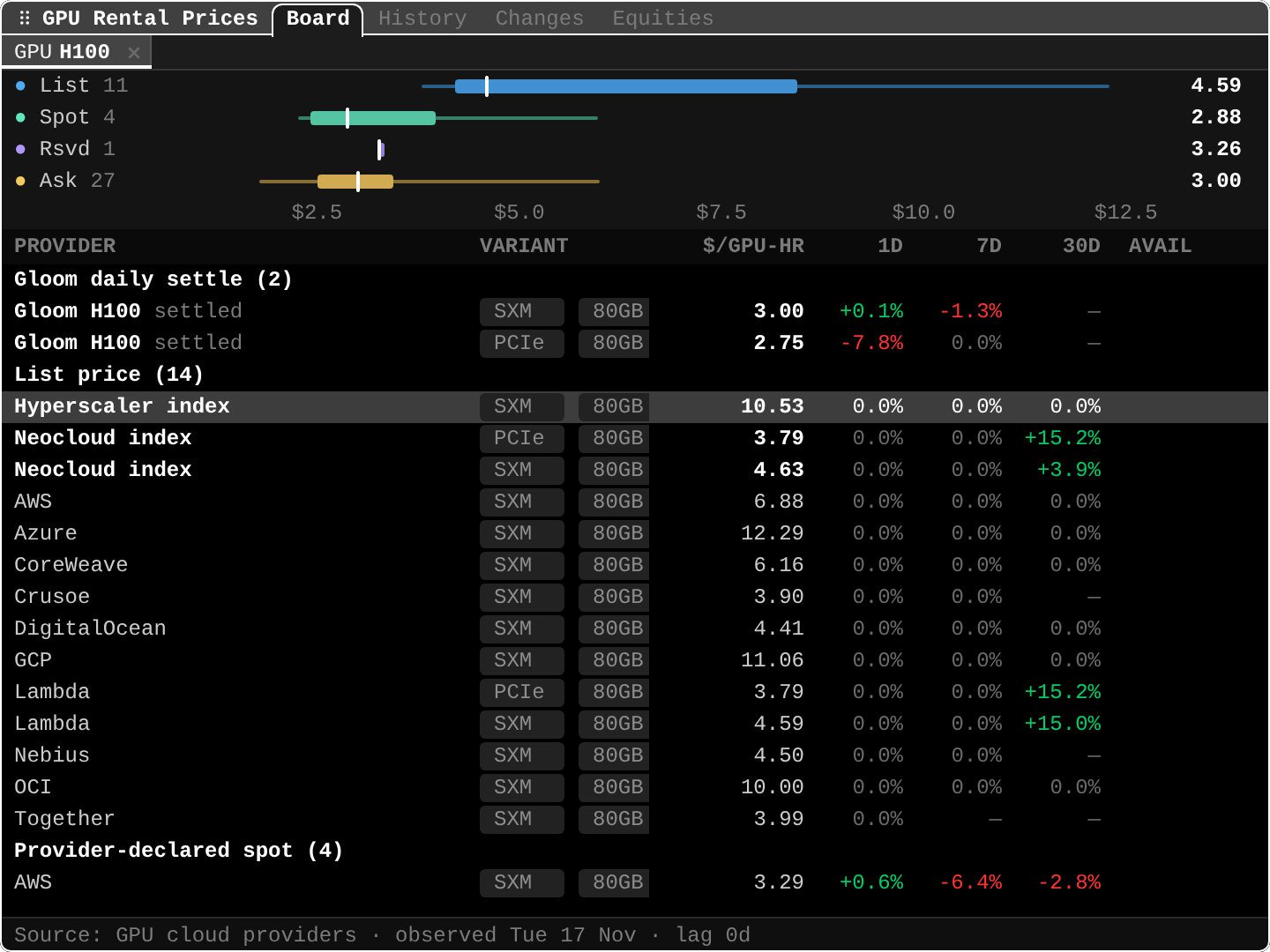
HMgroups the 500 largest US stocks and recolours with live prices.GPUrental prices.By model and provider, with history, price changes and related stocks.
Assistants can drive the terminal.
Connect one with
MCP, and with Terminal control it can operate the open terminal or desktop app.Share any pane, or ask about it.
Post a pane to chat as a picture, or open Ask Gloom with it attached.
Updates7
0.16.6
Share any pane, ask Gloom about it, and a calmer reader
GitHub releaseHighlights
- Share any pane. One
Shareentry in every pane menu, orCmd+Shift+S(Ctrl+Shift+Selsewhere), previews the pane as a picture, then posts it to a chat channel or copies a link. (#1703) - Ask Gloom about any pane. A small button beside
?, the pane menu orAlt+Aopens a new conversation with that pane attached. (#1690) - A calmer reader. Stories from
SRCHand the news open with the headline and the gist, in short paragraphs without page clutter, andnandpstep through results. (#1695) - Chat that stays put. The message list keeps your place, you can react with emoji in sync with Discord, and bots carry a badge. (#1701, #1693, #1706)
- Charts keep up. Charts inside a pane follow a resize to the pixel, and
CMPreads every series under the crosshair, pans without jumping and loads older bars as you pan back. (#1667, #1714, #1691) - A closer
MAP. Zoom to a harbor, pan with the arrow keys, and see countries in proportion. (#1689) - Perpetual markets everywhere. Quote, search and list them like any other listing, with a stock's perpetual premium and funding in watchlists and portfolios. (#1698, #1660)
Also in this release
- Exports name their units and end with their source and dates, and
CBRexports carry a citation per row. (#1666, #1712) - A held shortcut runs once per press, and theme previews and new charts paint together. (#1694, #1692)
OVDVandOMONfit the skew when a chain has no open interest, andHIVGadds per-session 25-delta skew. (#1700, #1705)- Command line: tables fit a narrow
--width, an unknown function name lists the closest ones, andshot --strictexits non-zero when a capture is unusable. (#1713, #1699) - Rates: find central banks and economic series by name, and read euro and rating high-yield spreads, CDX 1M moves and the EU carbon allowance auction price. (#1711, #1668, #1671)
- Paste a list of symbols into a watchlist from the command bar. (#1687)
- Share any pane. One
0.16.5
In-app docs, smoother resizing, and a fuller data catalog
GitHub releaseHighlights
- The docs open inside Gloom.
?on a pane opens its entry inDOCS,DOCS <function>jumps to any function, and an offline copy works without a network. (#1613) - Resizing follows the pointer. Docked panes with their divider and floating panes from any edge track the mouse, and charts and heat maps keep up, drawn at the pane's own pixel size. (#1615, #1629, #1657)
- Copy Screenshot paints what you see. SVG gauges and charts, images, gradients and masked icons are in the copy. (#1614)
- A bigger data catalog.
CATlists about 455 chartable series instead of 153, from research attention and hiring to GPU indexes, awards and perpetual long-account share. (#1616, #1627) - Futures and rates, read properly. Settlements and contract terms in
CTMand quotes, rates reports in bp with the daily move, and more curves open inCTM. (#1572, #1607, #1584, #1618, #1634, #1641) - 13F and lists. Compare a 13F manager with an ETF, import a 13F as a portfolio, and add many symbols to a watchlist or portfolio at once. (#1621, #1635)
- Earlier warnings. Alerts can fire days before earnings, CPI and FOMC. (#1598)
- Assistants can capture a pane of the desktop app with
pane.screenshot. (#1622)
Also in this release
- Listings: rows are labelled by listing (
SAN:EPA,SAN:NYSE), a bare code several companies list asks which exchange, every command uses one venue list, andTSE,KRXandEURONEXTread as venues. (#1592, #1604, #1589, #1649, #1661) - Exchanges: Egypt, Oman, Bahrain and Kuwait keep their Sunday to Thursday week, and OMR, BHD, KWD, JOD, TND and LYD prices show to the mill. (#1585, #1594, #1599, #1602, #1617)
SEAShas a Weekdays tab, and report dates carry the year and the trading day, with a time zone setting. (#1324, #1583)PERPdates each venue's own observation and opens the stock'sDES, and CDS reports carry the 5Y spread and date each view by its last trade. (#1626, #1654, #1665)- Desktop dialogs show their keys on the buttons, and starter packs are templates you apply from the research heading. (#1597, #1611, #1612)
- The install script checks its download's SHA-256, and the README covers Windows.
- The docs open inside Gloom.
0.16.4
Assistant control, split plugins, and a calmer Ask Gloom
GitHub releaseHighlights
- Assistants can drive the terminal.
MCPin the command bar connects Claude Code, Codex or Cursor to Gloom, and an assistant connected to Gloom Cloud with Terminal control can operate the open terminal or desktop app. (#1530, #1532) - Built-ins you can switch off. Market Overview, Macro and Ticker Research are split into smaller plugins, and the Plugins pane (
PL) shows what Gloomberb is made of, with starter packs. A switched-off plugin's panes stay in your layout. (#1528, #1533, #1535, #1540, #1547, #1553) - A calmer Ask Gloom. The question field has the keyboard from the first moment, each source reads as one line, and you can rate an answer with a thumbs up or down. (#1517, #1512, #1549)
- Options in the terminal.
OMONpicks strikes by window or delta band and ranks LEAPS across symbols,--expirationtakes a date, andOSAsizes a hedge budget. (#1522, #1518, #1524, #1562, #1563) - The regular close, plainly. Quotes, boards, portfolio and the header SPY headline the regular-session close with the after-hours print on its own line, and every report footer says how delayed the data is. (#1555, #1578, #1557)
- Move a pane to a layout of its own. Give a chart or research pane the whole window, and move it back later. (#1527)
- IBKR sign-ins. The Brokers pane says why a sign-in ended and shows when it ends, and Connect renews it early. (#1565)
Also in this release
- Heat map: colour by session, an honest board age, labels on the largest tiles. (#1569, #1516)
- Colour-blind safe themes, a list of theme ids, and chart lines you can tell apart without colour. (#1521)
- Global listings: FX pairs in any spelling, Hong Kong four-digit codes, Gulf and Tel Aviv sessions, a foreign listing's own earnings and filings. (#1507, #1551, #1513, #1571, #1508, #1514, #1515)
- Data: a stock split filed twice counts once, the economic calendar starts today,
AUCTsearches by benchmark and CUSIP. (#1552, #1554, #1582) - Newcomers: six dead ends in the CLI and terminal are fixed. (#1559)
- Chat: find channels and DMs in the command bar. (#1531)
- Assistants can drive the terminal.
0.16.3
Pane drags, broker equity, and a world map
GitHub releaseHighlights
- Smoother pane drags. Panes follow the pointer without redrawing the layout, and a quick click no longer leaves the window following the pointer. (#1493, #1499, #1500)
- Broker portfolios show their equity.
PFleads withNet Liq, labels the positions' sumGross, and addsCashandLev. The account is kept across restarts, a lapsed broker sign-in is named in the footer, andKELLYsizes from equity. (#1504) MAPas a world map. Country names on the map, and a flight opens where flights show. (#1495, #1498, #1492)- Holder values in the right currency.
HDSlabels each holder value in its own currency and marks depositary-receipt share counts. (#1496) - Members in other panes. Open a theme's or fund's members in
RRG,CORR,SIWorRIPL, or save them as a watchlist. (#1465)
Also in this release
- Arrow keys scroll detail panes that left scrolling unset. (#1502)
fnandfundamentals --csvwrite flat rows with the displayed columns. (#1494)- The CLI rejects unknown options, and
historysays why bars are missing. (#1497) - US quotes stay available after the close until an after-hours trade prints. (#1501)
- A zero enterprise value shows as missing, and trailing figures name the reporting currency. (#1489)
- Thinly traded listings use Gloom Cloud's not-stale verdict. (#1490)
0.16.2
Pane dragging, MAP layers, and steady after-hours numbers
GitHub releaseHighlights
- Drag panes from the whole bar. Panes and popped-out windows move from anywhere on their header bar again, not only the grip and the title. (#1478)
- Chat sends after launch. Messages typed right after opening the app go out instead of waiting for a channel switch, and a DM that cannot start now says why. (#1410, #1409, #1426)
- One rule after hours. The headline,
gloomberb tickerand the watchlist hold the regular close and its move; the extended move sits on its own line, and the heat map reads the regular move outside the live stream. (#1408, #1422, #1435, #1470) MAPwith layers. Ships, ports, energy sites and airports with icons, coastlines that sharpen as you zoom, and GEO series inGandCORR. (#1413, #1484, #1421, #1441)- A pane that crashes stays in its frame. The rest of the app keeps running. (#1412)
- Bigger panes.
PERPgets Board, Rankings and Compare tabs,HDSa 13D/G tab, andPFshows value, weights, targets, drift and cash. (#1432, #1488, #1429, #1473)
Also in this release
Esctakes the keyboard from a chart back to the tab strip inDES. (#1417)- Every
fntext report ends with its source, as-of and status, and errors give working examples. (#1416, #1427, #1472) - CLI errors say why a quote or history failed, and
--exchangeandSYM:EXCHwork in more commands. (#1414, #1430, #1477) - The heat map follows the selected theme and
HMhas a text report. (#1425, #1445) - Asia-Pacific quotes survive local holidays and midday breaks, and 1D and 1W history work in the pre-market. (#1487, #1474)
- Fewer desktop timeouts, and the Insider tab no longer crashes on the web. (#1482, #1483)
0.16.1
A live heat map, restart on your terms, and PORT for big accounts
GitHub releaseHighlights
- A heat map that moves.
HMgroups the 500 largest US stocks by sector and industry, sizes them by the square root of market cap (plain market cap is one click away) and recolours and glides with live prices. (#1405)
- Restart on your terms. The desktop app downloads an update in the background and shows a Restart button instead of restarting by itself. (#1400)
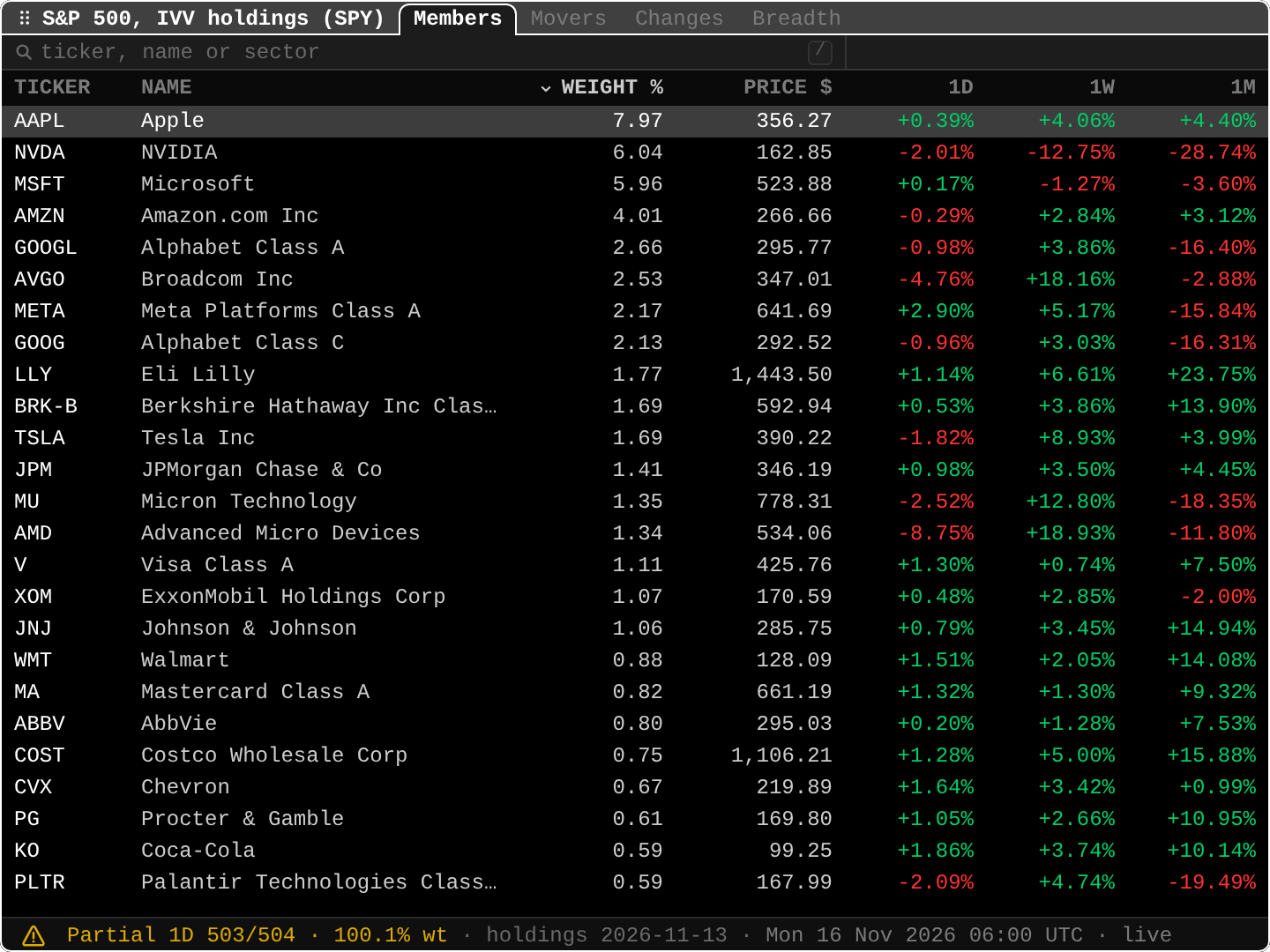
PORTrisk on real accounts. Risk, Factors, Correlation and Stress estimate on the holdings that qualify and say how much of the account they cover, instead of dashes when one holding is foreign or unquoted. (#1402)MEMBETF members. Members, movers and index changes for IVV, IJH, IJR, IWM and IWB. (#1391)
FXCwith 45 currencies. Pick a set or filter the list, with country flags and a tint for each cross's move. (#1399, #1401, #1403)- The right listing.
NET:in the command bar lists a symbol's venues, busiest first, and a bare symbol added to a list takes the busiest. (#1396)
Also in this release
- Single-ticker panes can link to another ticker pane. (#1383)
- The desktop window reopens where you left it, and a fullscreen pane's corner leaves fullscreen instead of closing the pane. (#1384)
- Search badges coins and funds and hides mutual funds that cannot be quoted; mutual fund NAVs stay current until the next publication window and
DEShides Options and 13F for them. (#1389, #1393, #1395) - Market movers use direct average volumes. (#1392, #1394)
- Equity perpetual rows stay on the chosen listing, and
PEBdates EPS by the company's report when no publication date exists. (#1397, #1404) - Installing IBKR Gateway installs Interactive Brokers first, so it loads in the same session. (#1398)
- A heat map that moves.
0.16.0
Supply chain maps, GPU rental prices, and images in chat
GitHub releaseHighlights
SPLCsupply chain. See who a company sells to and buys from, with each link's share of revenue, as a table or a flow, and follow links several hops out.RIPLlists the customers and suppliers of your holdings that report soon. (#1298, #1304, #1313, #1322, #1326)
GPUrental prices. GPU rental prices by model and provider, as each provider lists or declares them, with history, price changes and related stocks. (#1299, #1312, #1342)
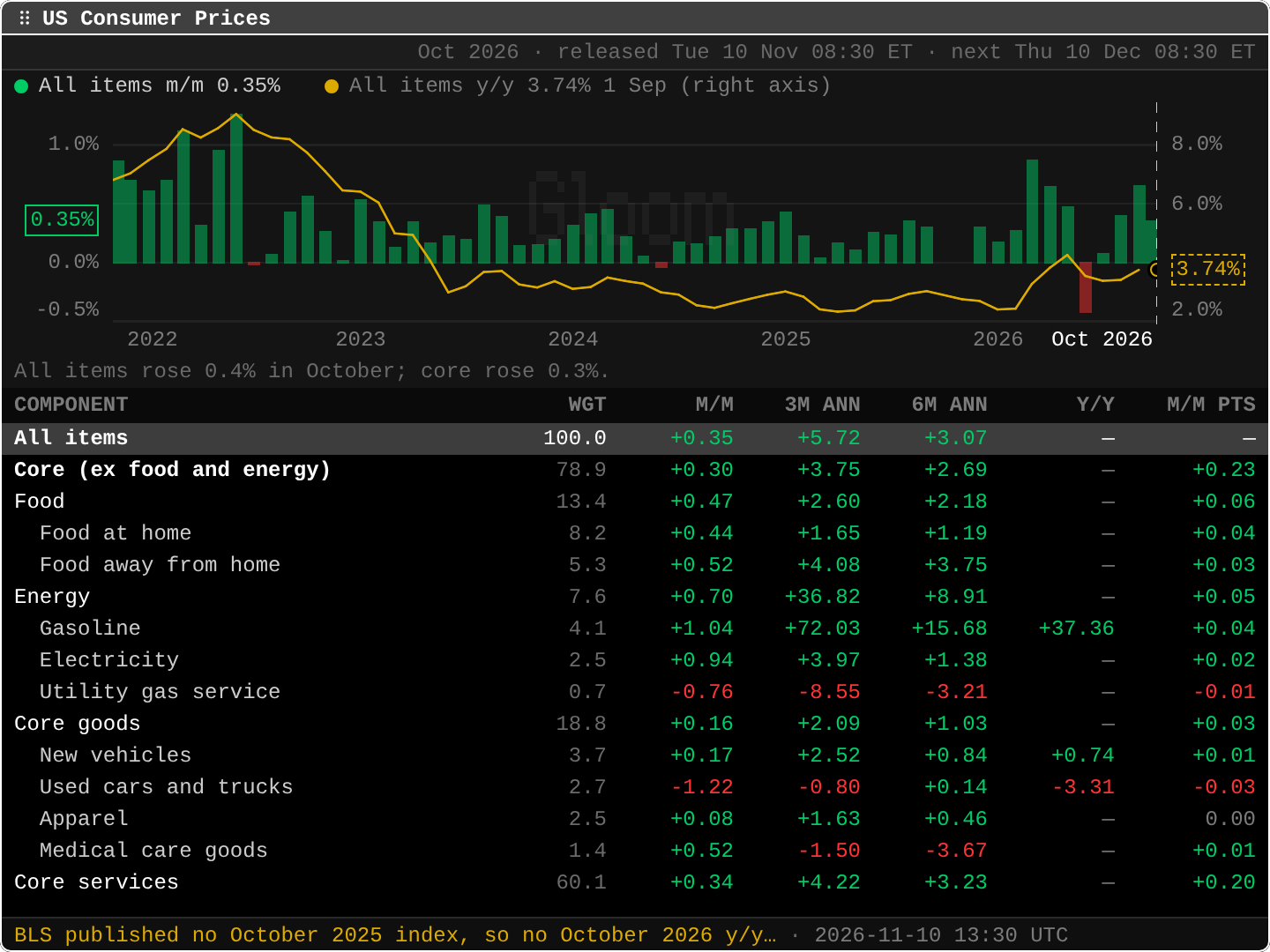
CPIconsumer prices. US inflation by component with weights, each component's contribution to the headline and the next release date.MDAYshows how a ticker moves on CPI, jobs and FOMC days. (#1297, #1332)
- Images in chat. Paste, drop or attach up to four images in the desktop and web apps; the terminal opens them in the browser. Your own message also shows as sent right away. (#1380, #1376)
- Ask Gloom knows your portfolios. It lists what a portfolio or watchlist holds, uses your own portfolio ids instead of guessing, and Undo works.
PFprints the same holdings. (#1381, #1388)
Also in this release
- Valuation:
RDCFshows the growth a price assumes,PEBthe price against multiples of EPS, andSIWthe crowded shorts in your lists. (#1302, #1330, #1329) - New panes:
TRIALclinical trials,CLTRSEC comment letters,FDAdrug and device reports and recalls, andRETURNreturns by interval. (#1349, #1354, #1357, #1363) - News and search: filter, mute and pop out articles, an
FHfeed of the latest news, article and filing lookup, asset class filters and suggested recents in the command bar. (#1352, #1356, #1358, #1360, #1362) - Lists:
THEMbaskets are a tab inBI, the portfolio's list is aHMtab,ddeletes the selected ticker, and the M&A pane has a Distress tab. (#1379, #1371, #1373, #1390) - Chat: an unread inbox, back navigation in a narrow pane, selected text stays selected, and double Esc closes it. (#1364, #1377, #1368)
- Fixes: a bad cloud socket URL no longer crashes the web terminal, desktop timeouts name the request that stalled, and NSE and BSE keep their closes through holidays. (#1375, #1369, #1300)
0.15
Sep 24 – Oct 3, 2026
Live prices everywhere, options and rates research, and keyboard-first panes
Plugins get their packages on every install.
Trader tools on every chart.
Link panes to a watchlist.
Alerts reach you when the app is closed.
Charts keep working after the close.
Updates9
0.15.8
Charts after the close, oil and gas inventories, and onboarding currencies
GitHub releaseHighlights
- Charts keep working after the close. Intraday and 1D charts of US and non-US listings no longer go empty or fail once the market closes, or the next morning before the new session's first delayed bar arrives. (#1279, #1281, #1284)
- 1D shows the latest session. A 1D chart covers the listing's latest trading session in the venue's own time instead of a rolling 24 hours, and US listings get an
Extended hourstoggle for pre-market and after-hours bars. (#1279) - Oil and gas inventories in
DOE. The EIA's weekly crude, product and gas storage numbers against their five-year ranges, charted over the year, withNGSopening the gas tab. (#1288) - Onboarding in the listing's currency. Positions added at first run take the listing's currency, with a Currency field to change it, and Avg cost clears after each add. (#1285)
Also in this release
- Charts: a listing a few days old charts the range it has traded instead of a two-point line, and 30m on 3M charts the intraday history that exists instead of nothing. (#1284, #1287)
- Deleting a watchlist also removes it from its tickers. (#1283)
- ROE reads N/M when equity changes sign, instead of figures like 15,367%. (#1286)
- Exchange suffixes like
TTALO.HELresolve to the listing. (#1285) - Section headings are set in bright, bold title case. (#1273, #1280)
- A fullscreen pane no longer has the floating border drawn through it. (#1282)
0.15.7
Alert emails, forms in a modal, and market data through Gloom Cloud
GitHub releaseHighlights
- Alerts reach you when the app is closed. A price alert that triggers while no Gloom app is open now arrives by email with the symbol, the price and whether it is real-time or delayed. Re-arming an alert at the same target emails again. (#1264)
- Forms open in a central modal. New watchlist, New portfolio, Set position, Add alert, plugin wizards and every confirm open in a centered dialog instead of the command bar, with
Tabbetween fields andCtrl+SorCmd+Sto submit. Broker profiles are managed in the Brokers pane. (#1226) - Pick companies on day one. A new account with an empty or untouched starter watchlist is asked "Which companies do you follow?", with search and a grid of company cards. (#1247)
RISK,EXECandEKare Pro in the terminal. Free accounts see an upgrade wall; the free per-company pages on gloom.sh stay open. (#1272)- Market data comes through Gloom Cloud. Quotes, history, fundamentals, research, movers and heatmaps load from Gloom Cloud instead of provider code on your device. Signed-out delayed access still works. (#1274)
Also in this release
0.15.6
Panes that follow a watchlist, a calendar feed, and first-run desks
GitHub releaseHighlights
- Link panes to a watchlist. A chart,
OMON,OPX,SEAS,FA, company news and the other single-ticker panes can follow a watchlist, portfolio or scanner from their pane menu, the wayDESdoes. (#1266) - Your dates in your calendar.
ACM> Calendar gives a private link for Google, Apple or Outlook Calendar with earnings and ex-dividend dates for your holdings and watchlists, plus FOMC, CPI, jobs, PCE and GDP releases. (#1265) - Desks from the first question. A first-run "What do you trade?" seeds trading desks, and
DESKadds one later. (#1263) - Charts on the pane. Charts draw on their pane's own surface, with a gradient under area lines. (#1204)
Also in this release
- A portfolio of non-USD holdings totals in its own currency, with its symbol, instead of an unlabelled USD amount. (#1269)
OSAbuilds strategies on expiry days, solving a missing IV from the quote mid, and a seeded strategy starts at zero P&L. (#1270)OPXsays when SPX box spreads are left out of the dealer range. (#1260)
- Link panes to a watchlist. A chart,
0.15.5
Trader chart tools, options positioning, and seasonality
GitHub releaseHighlights
- Trader tools on every chart. VWAP, anchored VWAP, volume profile and ATR join the indicators, extended-hours bars are shaded, and a price level drawn on a ticker shows on every chart of it and can become a price alert. (#1255, #1256, #1258, #1259)
OPXoptions positioning. Open interest by strike and expiry, max pain and dealer gamma for a ticker's chain. (#1257)SEASseasonality. A ticker's monthly returns by year as a heatmap, each month's average and hit rate, and every year overlaid on one calendar. (#1254)GCgovernment curves. Curves from their publishers, compared across dates, with a forward curve and a World tab. (#1245)- Help on any function.
HELP <fn>orF1opens a card with what the function does and how fresh its data is on your plan. (#1243, #1248)
Also in this release
- Installing IBKR Gateway brings the Interactive Brokers plugin along, and a half-installed plugin repairs its packages on launch. (#1237)
- The web terminal installs as an app from the browser, and a web plugin that fails to load tries again. (#1233, #1232)
- Plugin tokens set on this device survive another device's settings syncing in. (#1261)
HALTrefreshes every minute. (#1252)- On Linux without
xdg-open, opening a link copies it instead of failing. (#1262)
0.15.4
Plugins that load everywhere and a fuller DES
GitHub releaseHighlights
- Plugins get their packages on every install. BYOK AI and other plugins with dependencies now load in the desktop app and the standalone terminal without Bun installed, and a plugin that was installed without its packages gets them on the next launch. (#1230)
- Plugins on Windows without Developer Mode. Installs from source or npm on Windows link external plugins with a junction, so they load without admin rights. (#1227)
- A fuller
DES. The Overview tab adds float, next earnings, ex-dividend date, beta, short float, institutional and insider ownership, and a Profile grid with employees, fiscal year end, SIC and website; each figure opens the function that explains it. (#1229)
Also in this release
0.15.3
Merger arbitrage, social mentions, and sign-in brokers
GitHub releaseHighlights
- Merger arbitrage in
MA. Pending deals with live arbitrage spreads, annualized returns and expected close, plus an M&A tab in Ticker Research. (#1174, #1215) - Social attention in
BUZZ. Daily X posts, Reddit mentions and Wikipedia page views per ticker, also as equity screener columns. (#1169, #1170) - Brokers you sign in to. IBKR and Robinhood connect from
Add Brokerby signing in, and your Gloom account holds the connection, so every device and your agents share it. (#1129) - Bloomberg names work.
IMAP,CF,NSE,BLP,HRA,GLCOand other Bloomberg mnemonics open the matching function. (#1189) - Generic futures and credit boards. Chart and quote
CL1,TY2orVX1with a switchable roll rule, view a futures curve as of a past date inCTM, and browse index and sovereign CDS inCDXandSOVR. (#1205, #1206, #1207, #1222) - Deeper fundamentals.
FAadds ratio tabs for profitability, leverage, liquidity, efficiency and valuation,SEGsplits quarterly revenue by product, segment and region, and the screener adds returns, beta, P/B, EV/EBITDA, ROE, revisions, upside and IV. (#1211, #1115, #1213)
Also in this release
IPOis built in and now covers the US, Hong Kong, India, Japan, Australia, London, Euronext, SIX, Deutsche Börse, Shanghai and Shenzhen. Market Heatmap, Market Halts and Fear & Greed are built back in. (#1225, #1183, #1216)- Earnings and news:
ERNshows the market's earnings days and each company's report history,MOSTadds pre-market, after-hours and gap lists, and news shows publishers and wire times, withTOPas a ranked 20. (#1200, #1224, #1223) - Boards: option chains show IV, volume and open interest by default, the Treasury curve adds 2s10s, 3m10y and 5s30s, the rate path leads with the moves priced, and the futures board adds livestock, soy crush, KC wheat and aluminum. (#1188, #1185, #1190, #1199)
- Official plugins update themselves, and typing an official plugin's code in the command bar offers to install it. (#1163, #1212)
- A new Halo app icon, a macOS Dock icon that follows your theme, and White as the default theme. (#1105)
- The app now reports crashes and counts which functions get opened, without tickers, queries or portfolios. Turn either off with
gloomberb config set telemetry.crashReports falseortelemetry.usage false, or setGLOOMBERB_NO_TELEMETRY=1. (#1147, #1181)
- Merger arbitrage in
0.15.2
Your own indicator periods, and a lighter global install
GitHub releaseHighlights
- Set your own indicator periods. The Indicators dialog (
ion a chart) lists each indicator by its full name and period, andpchanges the period of a checked SMA, EMA, Bollinger Bands or RSI to any whole number from 2 to 500. (#1102) - Global installs stop slowing down over time. An install from
bun install -g gloomberbrecorded a timing entry for every render and never freed it, so it grew heavier the longer it ran. Thanks @Harshil-Jani. (#1101)
- Set your own indicator periods. The Indicators dialog (
0.15.1
Panes that stay open, steady live prices, and quieter warnings
GitHub releaseHighlights
- Panes you open stay open. A pane opened right after launch, while the broker sync was still running, or from a popped-out window no longer closes again, and undo history survives. (#1099)
- Live prices keep their digits. Each instrument streams at one precision: 150.10 stays 150.10, a coin crossing $100 keeps its decimals, and compact totals stop trimming zeros. (#1099)
- Warnings only when something is wrong. Panes no longer show partial or stale for ordinary data, or flash stale while they refresh from cache. Real problems still show in the pane's warning icon. (#1100)
- Long research sessions stay light. The app keeps the recent tickers' histories and statements instead of every ticker since launch, so memory stops climbing until a restart. Thanks @Harshil-Jani. (#945)
0.15.0
Live prices everywhere, options and rates research, and keyboard-first panes
GitHub releaseHighlights
- Prices stream live. Quotes, charts, boards, portfolio columns and research panes update several times a second from one shared feed, and keep streaming when the window loses focus. (#1080, #1081, #1082, #1083, #1084, #1085, #1086, #1087, #1088, #1067)
- Options and volatility research.
OVDVimplied volatility surfaces, realized volatility cones, IV history inHIVG, rich or cheap inVCA, multi-leg scenarios inOSA, American option pricing, and expected moves and skew inOMON. (#969, #1018, #989, #993) - Rates, macro and positioning.
WIRPrate paths,BTMMmoney markets, G20 policy rates,CTMfutures curves,COTpositioning, theDDISdebt maturity wall and a bond calculator. (#973, #974, #982, #977, #979, #995, #980) - Congress, 13F and short data per ticker. House and Senate trades with returns, 13F holders and crowding, daily short volume, estimate revisions, and alerts on Congress and fund filings. (#978, #990, #1029, #981, #984, #988, #998, #992)
- New tools. The
EQSequity screener, aBTbacktester for indicator rules,PORTandMARSportfolio risk, time and sales inTAS, relative rotation inRRGand theCRYPcrypto board. (#1003, #1010, #1004, #986, #999, #1051) - Keyboard-first panes. Tabs sit in each pane's title bar with one query bar, footer hints bind their keys, and
.opens a menu with every pane action. (#1038, #1092, #1091)
Also in this release
- Send feedback from the status bar, with an optional screenshot and scrubbed debug logs. (#1089, #1096)
- Plugins on the new pane chrome (TV, IBKR Gateway, Hacker News, Substack and others) install again, and updates show for plugins outside the registry. (#1054, #1094, #958)
- Ask Gloom streams on the desktop and keeps a sidebar of past conversations. (#948, #949)
- The CLI gets grouped help, per-command help and readable output. (#1013)
- The IBKR setup steps name the menus IBKR actually uses. (#1098)
- A data-accuracy sweep across quotes, sessions, dividends, earnings, FX, futures and statements: moves are measured from the right close, prices keep their currency's minor unit, and consensus is dropped for quarters already reported.
0.14
Sep 18–19, 2026
Teams, investment theses, and a faster terminal
Updates2
0.14.1
Custom keybindings, safer plugin loading, and a movable data folder
GitHub releaseHighlights
- Keybindings are yours. Rebind every global and pane key from the Help pane, the command bar, or
gloomberb config set keybindings.*. Any command bar text can go on a chord, soF5can beCNandAlt+1can beDES AAPL. (#933, #934) - A broken plugin no longer stops the app. A plugin that fails to register is marked failed in the Plugins pane, with the reason, and everything else starts. (#932)
- Move your data folder.
GLOOMBERB_HOMErelocates the whole~/.gloomberbfolder: config, database, plugins and plugin cache. (#932) - TV stops burning a core. A player stranded by a reload is reaped at startup, and playback no longer decodes more than the pane can show. (#937)
- Analyst targets get a chart. The consensus target is plotted from the dated targets in the ratings history, and the pane's context moves to the status bar. (#939)
Also in this release
- Jobs adds evergreen and contract shares and an open roles column. (#940)
- The chat sidebar gets consistent sections, a foldable channel list and a drag handle. (#941)
- Help renders its shortcut and function lists as real tables. (#938, #944)
- Price-only charts use the source's real interval list, and Auto steps down when a preset's interval is unsupported. (#935, #936)
- Package-managed installs (Nix, distro packages) say to update through the package manager instead of failing on a read-only filesystem. (#932)
- Keybindings are yours. Rebind every global and pane key from the Help pane, the command bar, or
0.14.0
Teams, investment theses, and a faster terminal
GitHub releaseHighlights
- Teams. Create a team from the terminal and share layouts, watchlists, paper portfolios and notes with it. Status bar tabs group by team, and notes now live in Gloom Cloud. (#871, #874, #876, #878)
- Investment theses. Every ticker gets a Thesis tab, and the
THESISboard scores your theses by weight across a portfolio or a basket. (#893, #919, #923) - Three new research tabs.
Execfor named executive pay,Risksfor 10-K risk factors with year-over-year changes, and8-Kfor the company's current reports. (#738, #739, #740) - Hiring data. The
JOBSpane and research tab read a company's open roles, andHIREmovers rank who is hiring. (#914, #929, #930) - ASKG. An assistant pane with streaming replies and a command bar entry. (#737)
- Plugins you manage in place. Install, update, remove and set up plugins from the Plugins pane without a restart. Prediction Markets, Fear & Greed, the heatmap, IPO calendar, halts, polls, TV and bring-your-own-key AI now ship as plugins and are restored on first launch after upgrading. (#872, #881, #837, #841, #905)
- A faster terminal. Startup and per-key latency are cut, and the binary is production-compiled. (#904, #906, #908)
- Onboarding rebuilt around your positions and Pro, with yearly billing. (#917, #926)
Also in this release
- Options: the selected contract moves to the status bar and the chain gets a spread column. (#920, #922)
- Charts: crypto price precision scales by magnitude, financial charts use the statement's reporting currency, and chart screenshots carry the wordmark. (#912, #808, #861)
- Market Valuation charts forward P/E over time and adds a realized NTM P/E field. (#909, #911)
- Lock a pane so the close shortcut leaves it open, and themes split into a colour scheme and a structural style. (#839, #744)
- A data-integrity sweep across statements, quotes, valuation, dividends, listings, FX, macro and portfolio math: units, currencies, periods and identities are preserved end to end, and missing data is disclosed instead of filled in.
0.13
Sep 4–8, 2026
Public company research, onboarding, and chart polish
Open a company research workspace in your browser, free and without an account.
Add headless earnings and events reports
Intel Macs finally have a working install.
Updates3
0.13.3
Intel Mac terminal build, headless auth, and first-visit workspace
GitHub releaseHighlights
- Intel Macs finally have a working install:
curl -fsSL gloom.sh/install | bashinstalls the newgloomberb-darwin-x64terminal build instead of refusing. The desktop app stays Apple Silicon only. - Homebrew and the self-updater no longer hand Intel Macs an Apple Silicon build that cannot launch.
- Headless callers can authenticate with
GLOOMBERB_SESSION_TOKEN. - The first browser visit opens as a six-pane workspace in the white theme.
Changes
- Let headless callers authenticate with GLOOMBERB_SESSION_TOKEN #726
- Open the browser first visit as a three-pane research workspace #729
- fix: keep Windows smoke cleanup from failing releases #730
- Open the browser first visit as a six-pane workspace in the white theme #731
- Stop macOS installs from handing Intel Macs an arm64 build #732
- Render pane screenshots from the routed provider #733
- Publish an Intel macOS terminal build #734
- Intel Macs finally have a working install:
0.13.2
ASKG tools, headless reports, and session recovery
GitHub releaseChanges
- Add headless earnings and events reports (#718)
- Fix command bar assist request race (#720)
- Let the ASKG protocol describe server executed tools (#721)
- Add headless data for filings panes (#717)
- Add ASKG client tool execution (#722)
- Let ASKG name a tool after any terminal shortcut (#723)
- Recover from expired cloud sessions (#724)
- Retry cloud session validation (#725)
0.13.1
Public company research, onboarding, and chart polish
GitHub releaseHighlights
- Open a company research workspace in your browser, free and without an account. Charts, financials, news and earnings calls are one click away.
- Start terminal onboarding with a company you follow, explore its research, then connect Cloud and Pro when ready. Browser sign-in and email verification continue the same journey. Fresh installs start without waiting for plugin downloads.
- Search calls, news and filings from the browser terminal. Pro adds full earnings transcripts and the live tape; Ask Gloomberb AI is coming soon.
- Charts keep room for the latest price, retain study panels while loading, and render intraday screenshots correctly.
- External plugins load across desktop and browser surfaces. Headless commands expose more market and macro panes.