Open-source finance terminals: what they do (2026)
An open-source finance terminal puts the research workspace on your machine and lets you inspect or change how it works. The useful ones are not miniature copies of every institutional service. They solve a smaller problem: answer the next market question without moving a ticker through ten browser tabs.
That can mean opening a quote, chart, filing, news feed, options view, portfolio, and notes in one command-driven layout. The distinction is control. The application, local state, and extension points are visible instead of being locked inside a website.
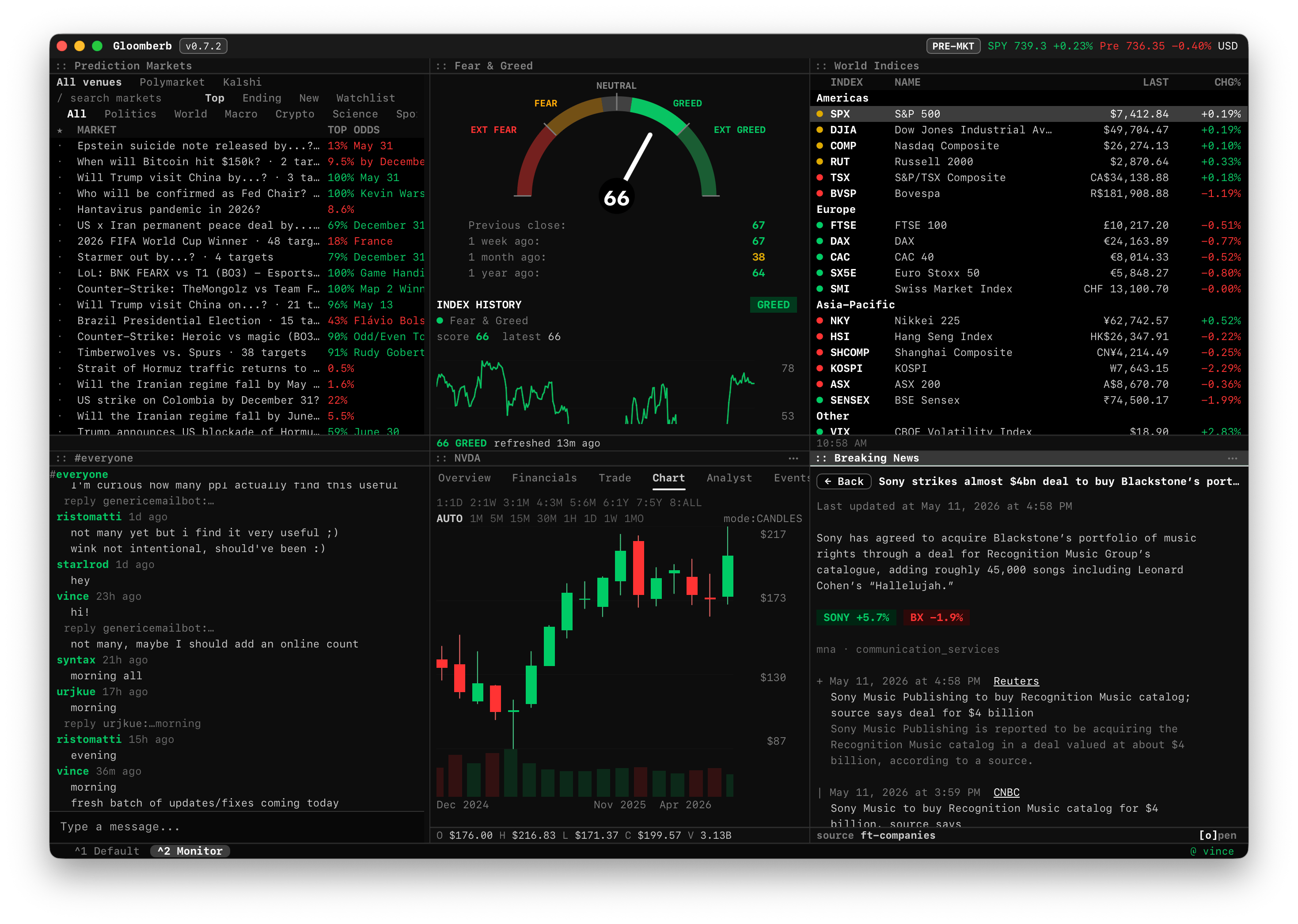
What makes a finance terminal useful
A terminal should reduce the distance between a question and the evidence needed to answer it. Common jobs include:
- Inspecting a company, its financial statements, filings, holders, and recent news.
- Comparing price performance, valuation, and correlations across several tickers.
- Watching market movers, sectors, global indices, rates, FX, and economic events.
- Keeping portfolio exposure, watchlists, alerts, and notes beside the research.
- Saving layouts for recurring workflows instead of rebuilding them every morning.
The interface does not have to look like a traditional green-on-black terminal. What matters is that commands and context stay consistent. In Gloomberb, a command such as DES AAPL opens company research, while SEC AAPL, 13F, MOST, and ECON move directly into filings, fund holdings, market movers, and the economic calendar.
Open source, browser, or institutional
These product categories overlap, but they make different tradeoffs.
| Type | Best fit | Main tradeoff |
|---|---|---|
| Open-source desktop or TUI | Individuals and developers who value local control, keyboard workflows, and extensibility | Data coverage depends on the sources, plugins, brokers, and hosted plans you connect |
| Browser research platform | Users who want a packaged subscription with little local setup | The workflow, pricing, and roadmap remain controlled by the vendor |
| Institutional terminal | Firms that require licensed datasets, professional messaging, support, compliance, and execution systems | High cost and a much broader bundle than many individual workflows need |
Open source does not make market data free. Exchanges, news providers, estimates, and real-time feeds can still carry licensing costs. It instead makes the workspace editable and lets users decide which paid services are worth adding.
Where a local terminal fits
A local application is useful when the workspace itself is part of your process. Layouts, watchlists, portfolios, notes, plugins, and command history can stay close to the rest of your tools. A terminal UI also works well over SSH, in a keyboard-heavy setup, or beside scripts that already produce structured output.
Gloomberb uses the same command-and-pane model in its desktop app and TUI. The open-source core includes layouts, commands, local portfolios and watchlists, plugins, screenshots, reports, and agent control. Gloomberb Cloud is optional infrastructure for account-backed features, hosted data, sync, and chat.
The practical advantage is not ideology. It is being able to add a data source, write a plugin, automate a report, or inspect how a command works when the default workflow stops fitting.
What an open-source terminal does not replace
A local research workspace is not automatically a substitute for an institutional platform. Bloomberg Terminal, for example, combines licensed multi-asset data, Bloomberg News, proprietary research, Instant Bloomberg, enterprise support, and integrated trading workflows. A smaller open-source product should not claim to reproduce that network.
Browser terminals can also be a better choice when a team wants immediate hosted access and a predictable package of data. Gödel Terminal, for example, focuses on a browser-based equity research workflow with quotes, news, SEC filings, financials, options, and export tools.
The right comparison depends on what you actually use:
- Read the Gloomberb and Bloomberg Terminal comparison if institutional data, messaging, or execution are part of the decision.
- Read the Gloomberb and Gödel Terminal comparison if the main choice is open-source desktop and TUI versus a paid browser terminal.
For broader shortlists, see the Bloomberg Terminal alternatives and Gödel Terminal alternatives guides.
How to evaluate one
Before moving a research workflow, test five things:
1. Coverage: Are the exchanges, asset classes, filings, news sources, and estimates you need available? 2. Latency: Is delayed data sufficient, or does the workflow require licensed real-time feeds? 3. Context: Can charts, news, filings, and portfolio exposure remain visible together? 4. Portability: Can you export data, keep local state, or extend the application when needed? 5. Total cost: Include data subscriptions, exchange fees, setup time, and the features you would still buy elsewhere.
A terminal earns its place when it shortens a repeated decision process. If it only recreates a dashboard you already have, another tool is probably unnecessary.
Try a real workflow
The fastest test is not a feature checklist. Install the application, open one company, add its chart and filings, then save the layout. The first-session guide walks through that process in about ten minutes, and the source code is public on GitHub.