Start here
Trading
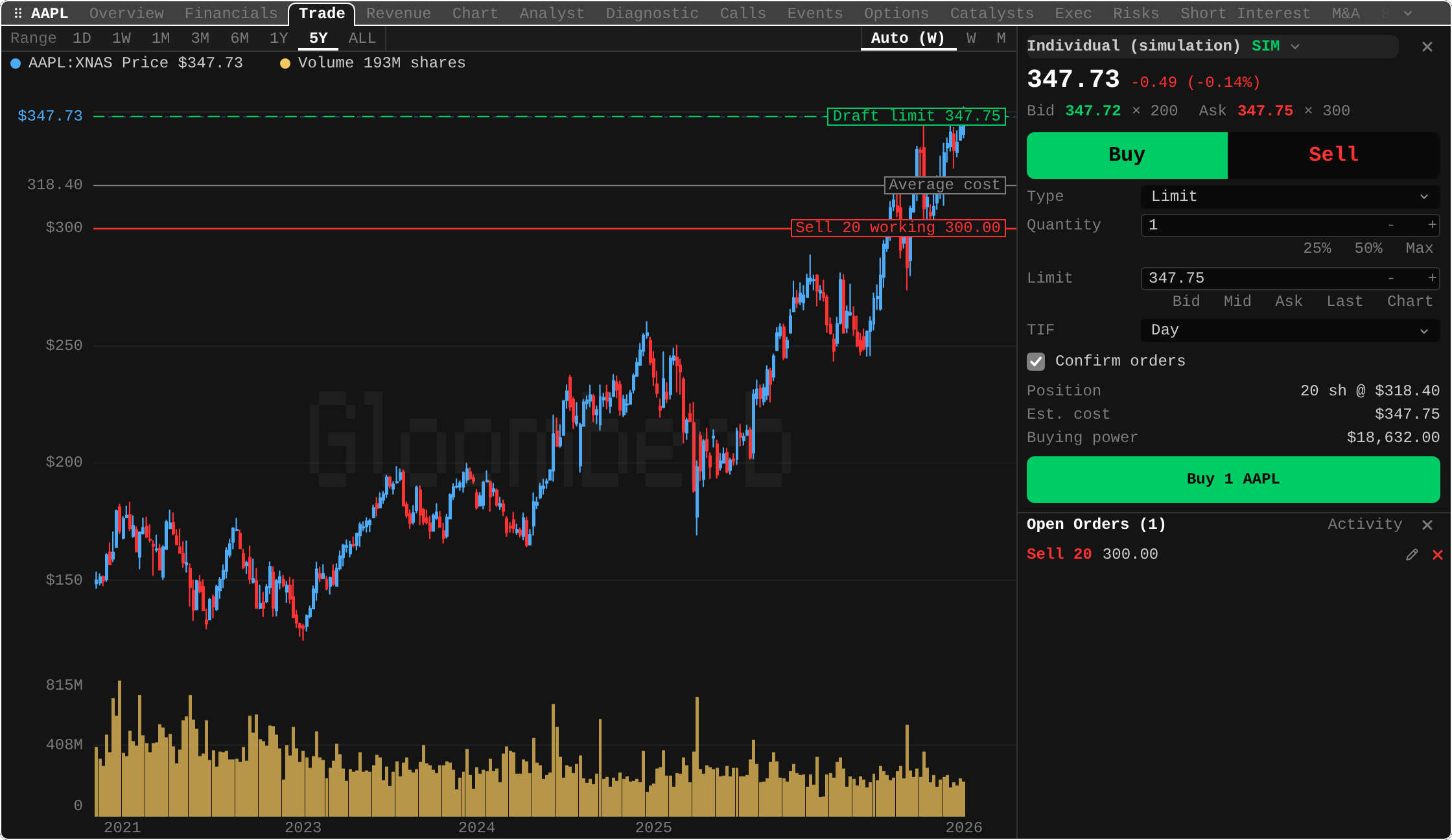
Place, change and cancel orders at your broker from one ticket beside the chart.
Brokers that trade
| Broker | Trades through |
|---|---|
| Aries | This ticket, for stocks, ETFs, options and spreads |
| Interactive Brokers | The IBKR Gateway plugin's own Trade tab, with Gateway or TWS running |
Both need the desktop app or the terminal. To connect Aries:
- Install Aries from Plugins (
PL). - Open Brokers (
BR), add Aries, press Connect and sign in to Aries in the browser. - Leave Include accounts on Simulation only for your first orders.
Open the ticket
- Chart: in a ticker's research pane, press
ton the Chart tab, or open the Trade tab. - Command bar:
BUY AAPL 10, orSELL AAPL 10 350with a limit price. - Options:
ton a contract inOMON, or on a spread inOSAto trade it as one order.
Order types
Aries takes market, limit, stop and stop limit (1 to 4), and spreads at a net debit or credit.
Take profit / stop loss, OCO pairs and trailing stops show only for a broker that runs them, which Aries does not.
Trade from the chart
- Press Chart beside a price (
c), then click the chart to set it. - Drag a dashed draft line to move that price.
- Drag a working order's line to load the change into the ticket.
Nothing reaches the broker from the chart: every change goes through review.
Safety
- A profile trades only with Enable trading on, which asks first.
- Every order gets a preview of its cost and fees from the broker first.
- Accounts are marked SIM or LIVE. A live order waits until you type its symbol.
- Simulation accounts can skip the review: untick Confirm orders.
Orders and fills
- Under the ticket: open orders, updated live, with edit and cancel.
- On the chart: working orders and your average cost.
ORD: orders and fills for any trading account.- Fills: a notification, even with no ticket open, and positions sync to the portfolio.
Keys in the ticket
| Key | Does |
|---|---|
b / s | Buy or sell |
1 to 4 | Market, limit, stop, stop limit |
5 6 7 | 25%, 50% or the most you can trade |
8 9 0 | Bid, mid or ask as the price |
p | Last as the price |
c | Pick the price on the chart (Esc keeps the old one) |
t / a | Time in force, account |
r / o | Review, open orders |
F6 | Move between chart and ticket |
< / > | Widen or narrow the ticket |
Esc | Close the ticket |
In ORD, m changes the selected order and c cancels it.
Fine print
- Aries takes Day, Good til cancelled, Immediate or cancel, Fill or kill, At the opening and At the close for stocks, plus extended hours on live accounts. Options and spreads take Day or Good til cancelled.
- Selling more than you hold is refused: Aries takes no short sales.
- One-click simulation orders still get a preview, and a warning brings the review back.
- Cancelling asks first, and the order can still fill before the broker confirms.
- While the broker's stream is down, Gloom polls for quotes and orders instead.
- Spreads take 2 to 4 legs and have no line to drag. A change keeps the legs: quantity or net price only.
- In a pane under about 900 px wide (100 columns in the terminal), the ticket takes the whole pane.
- Brokers turns trading off for a profile at any time.