Social posts, newsletters, TV and tech news (TWIT, SUB, TV, HN)
Four optional panes bring outside media next to your data: TWIT (a live X search), SUB (your newsletters), TV (live business TV) and HN (Hacker News).
- 3 min
- 3 questions
- Lesson 2 of 2
Why you would care
What are people saying, outside the data? Market-moving information increasingly appears first on social media, in a newsletter, or on a TV interview. Traders keep one of these panes open the way they used to keep a TV on the desk. The skill is to use them as a fast alert, then verify with data and primary sources.
The idea from scratch
| Pane | Source | What it is good for | Watch out for |
|---|---|---|---|
TWIT $NVDA | Posts on X matching a search (here a cashtag) | Fast reactions, rumors, executives' and analysts' posts | Spam, bots, paid promotion, fake news |
SUB | Your own newsletter subscriptions | Long-form analysis you already pay for or follow | Opinions, not data |
TV | Live business TV channels | Interviews, breaking coverage | Commentary moves fast and is rarely sourced |
HN | The Hacker News front page | What the tech community talks about | Tech news, not market news |
Two habits help:
- Weigh by reach and source: a post with 2,000 views from an unknown account is not news. An official company account is.
- Check the price: if a "breaking" post did not move the stock, the market may already know, or not believe it.
SUB, TV and HN are plugins: add-ons you install once (type the code and confirm; see chapter 02, Make it yours). TV in the terminal needs a video player that can draw in your terminal; on the desktop it plays inside the pane. TWIT needs a verified email.

See it in Gloom
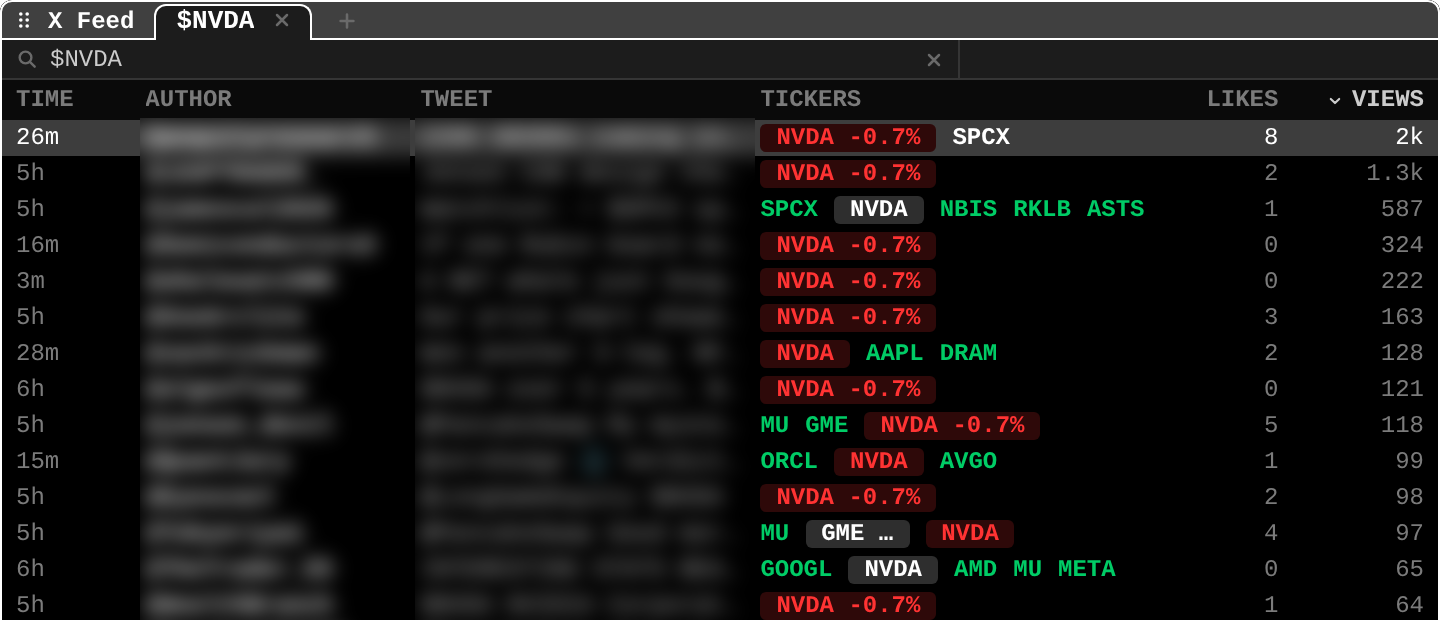
open themTWIT $NVDA (or any query), SUB, TV, HN.
TIME: post age (3m,26m,5h).TICKERS: every ticker the post names, with today's change (NVDA -0.7%): posts often mention several stocks at once.LIKESandVIEWS: engagement; sorted here by views (2k at the top).- The tab
$NVDAand the+: each search is a tab; add more. - Refreshed every two minutes.
Practice and recap
Try it3 tasks
- In the screenshot, how many views does the top post have? (About 2,000.)
- A post claims "huge contract coming" for a stock that did not move. Two possible reasons? (The market already priced it; or nobody believes it.)
- Which pane would you check for a long-form take you subscribe to? (
SUB.)
Common mistakes4 mistakes
- Treating social posts as sources.
- Counting likes as evidence.
- Reacting to TV commentary without checking the data screen.
- Forgetting that cashtag feeds attract promotions and spam.
Check yourself3 questions
- What is a cashtag?
- Why verify a social post against the price?
- What do you need before using TWIT?
Answers
- A ticker with a dollar sign in a post, like $NVDA.
- The price shows whether the market cares or already knew.
- A Gloom account with a verified email.
Words in this lesson5 words
- cashtag
- A ticker with a dollar sign in a social post.
- engagement
- Likes, views and replies a post gets.
- newsletter
- A regular publication sent to subscribers.
- plugin
- An add-on that brings new panes to Gloom.
- primary source
- The original document: filing, press release, data release.
Educational material about reading market data, not investment advice.