The command bar and function codes
The command bar is the one place you type everything: a function code, then what it applies to (DES AAPL), or plain words to search; it answers "how do I open X?".
- 5 min
- 3 questions
- Lesson 2 of 9
Why you would care
In most apps you click through menus. In Gloom you type. It feels slower for one hour and much faster for the rest of your life. A trader who wants Apple's options chain does not hunt for a menu. They type
OMON AAPLand press Enter.
The idea from scratch
A function code (traders also say mnemonic) is a short code for one screen: DES = description, HP = historical prices, N = news. Many follow the Bloomberg Terminal's codes, so people coming from there feel at home.
A command is built like a short sentence:
| You type | Verb | Object | What opens |
|---|---|---|---|
DES AAPL | DES (overview) | AAPL | Apple's overview page |
QQ NVDA, AAPL, MSFT | QQ (quote board) | a list | three tiles side by side |
SA NVDA above 240 | SA (set alert) | ticker, condition, price | a new price alert |
CN | CN (company news) | nothing | news for the ticker you are on |
ERN | ERN (earnings) | nothing | the market's earnings days |
Two rules hide in that table:
- Lists use commas.
QQ NVDA, AAPL, MSFT. - No ticker means "the one I am on". Many functions, typed alone, use the ticker of the pane you are looking at (the focused pane), or show a market-wide view.
See it in Gloom

GP AAPL: it reads the code and the ticker, says what will open ("Graph Price for AAPL"), and lists the matching pane. Press Enter to open it. From the public product screenshots.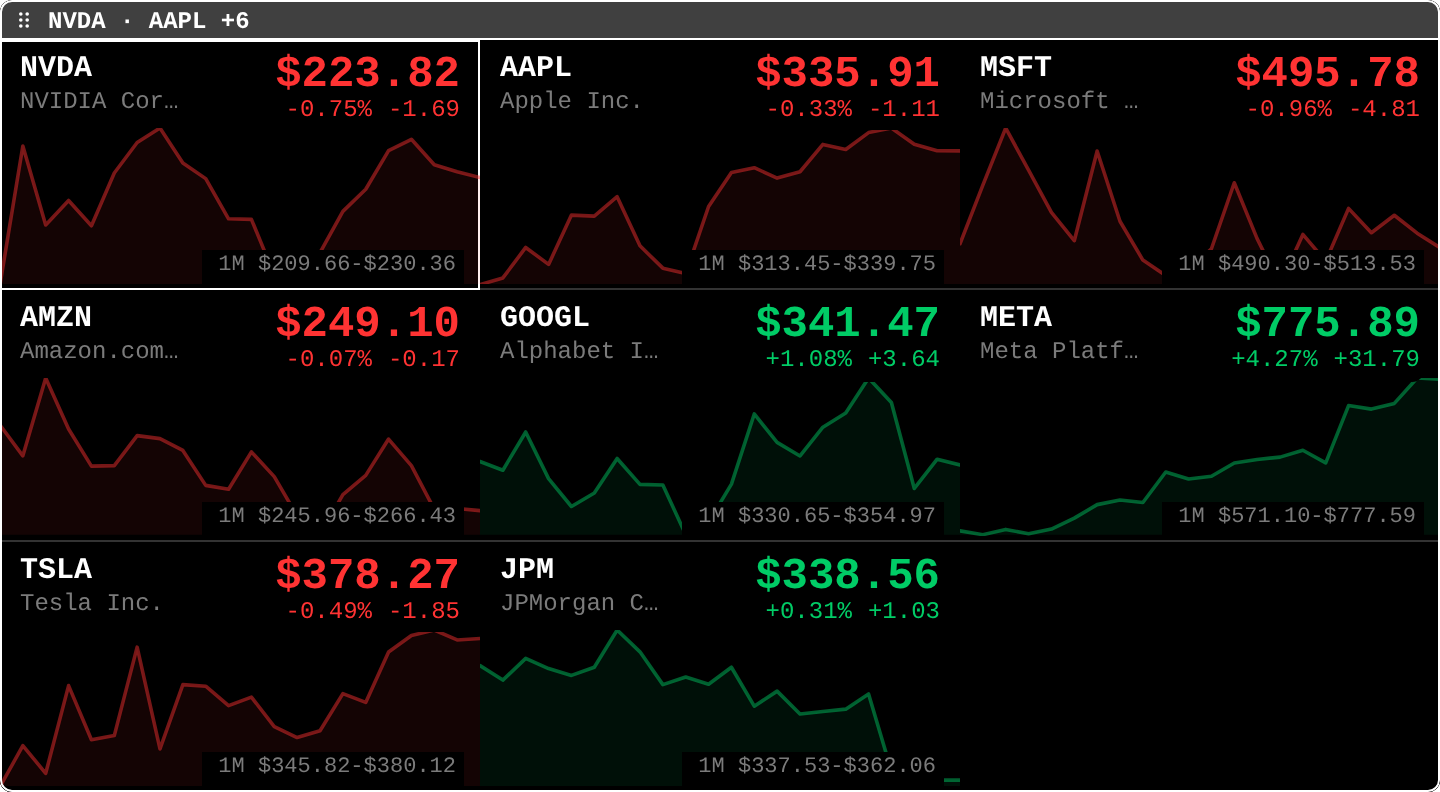
QQ NVDA, AAPL, MSFT, ... opens: one tile per ticker. The command bar turned one line of text into this pane.open itpress Ctrl+P anywhere. In the desktop app, Cmd+K (Mac) or Ctrl+K also work. Press ` `` (backtick) to jump straight into ticker search.
Inside the bar, the keys that matter:
- Type a code, a ticker, or words. Results appear below and narrow as you type.
Up/Down(orCtrl+P/Ctrl+N) move through the results.Tabaccepts a suggested argument when the bar offers one, so you type less.Enterruns the selected result.Shift+Enterruns its secondary action when there is one.Esccloses the bar.Ctrl+Uclears what you typed;Ctrl+Wdeletes the last word.
A few things the bar does on its own:
- Forms. Commands that need more answers (New Portfolio, Add Alert) open a small centered form after the bar closes.
Tabmoves between fields,Entergoes to the next one,Ctrl+Ssends it. - Plain words. Text that is not a code searches tickers and company names. Signed in with a verified email, the bar can also suggest commands for a plain-English request (rows marked ✦), and a question such as
why is NVDA down?offers to open Ask Gloom (see lesson: AI helpers). - Missing plugin. Typing the code of an official plugin you do not have yet (like
TV) offers to install it, after a confirmation. - Your own keys. After you type a full command, a
Bind a keyrow lets you put it on a key, likeF5forCN.
Practice and recap
Try it3 tasks
- Without the app: write the command that opens a quote board for SPY, QQQ and GLD. (
QQ SPY, QQQ, GLD.) - You are on a
DES TSLApane and typeCNalone. Whose news opens? (Tesla's: the focused ticker.) - In the app: open the bar, type
earn, and look at what it suggests before pressing anything.
Common mistakes4 mistakes
- Forgetting the space:
DESAAPLis one word the bar cannot split. TypeDES AAPL. - Using spaces instead of commas in a list. Use
QQ NVDA, AAPL. - Typing a bare code like
CNwhile focused on the wrong pane, then wondering why it shows another company. - Learning 100 codes on day one. Learn five (
DES,PF,MOST,TOP,HELP), then add one a day.
Check yourself3 questions
- What is the difference between
Ctrl+Pand the backtick key? - What does
Tabdo inside the command bar? - You type
CNwith no ticker while aDES MSFTpane is focused. What opens?
Answers
Ctrl+Popens the full command bar (functions, tickers, actions); the backtick opens ticker search directly.- It accepts the argument the bar suggests, when it suggests one.
- News for MSFT, the focused ticker.
Words in this lesson4 words
- function code (mnemonic)
- the short code of one screen, like
DESorHP - argument
- what the function applies to: a ticker, a list, a price
- focused pane
- the pane your keys go to right now; its border is highlighted
- ticker search
- the part of the command bar that finds tickers by symbol or name
Educational material about reading market data, not investment advice.