Searching calls, news and filings (SRCH)
SRCH searches earnings-call transcripts, news and SEC filings at once and shows every passage that matches your phrase, with saved searches that alert you to new matches.
- 3 min
- 3 questions
- Lesson 8 of 8
Why you would care
Who is talking about this topic, where, and since when? Themes spread through company language before they show up in numbers: "data center capex", "pricing pressure", "tariffs" start appearing in calls and filings across many companies. Counting and reading those mentions is how analysts spot a trend early. It is also the fastest way to find the exact sentence a CEO said about something.
The idea from scratch
Full-text search looks for words inside documents, not just in titles. Three document families matter for markets:
| Type | What it contains |
|---|---|
| Calls | What management and analysts said on earnings calls (chapter 04) |
| News | Stories and press releases |
| Filings | 10-K, 10-Q, 8-K, S-1 and other SEC documents (chapter 05) |
Good searches:
- Use a phrase in quotes for exact wording: "data center capex".
- Narrow by ticker to follow one company, or leave it open to see who else talks about it.
- Narrow by date to see when a topic started appearing.
- Save a search to be alerted on new matches.
The match count per document (2x, 3x) shows how many times the phrase appears.

See it in Gloom
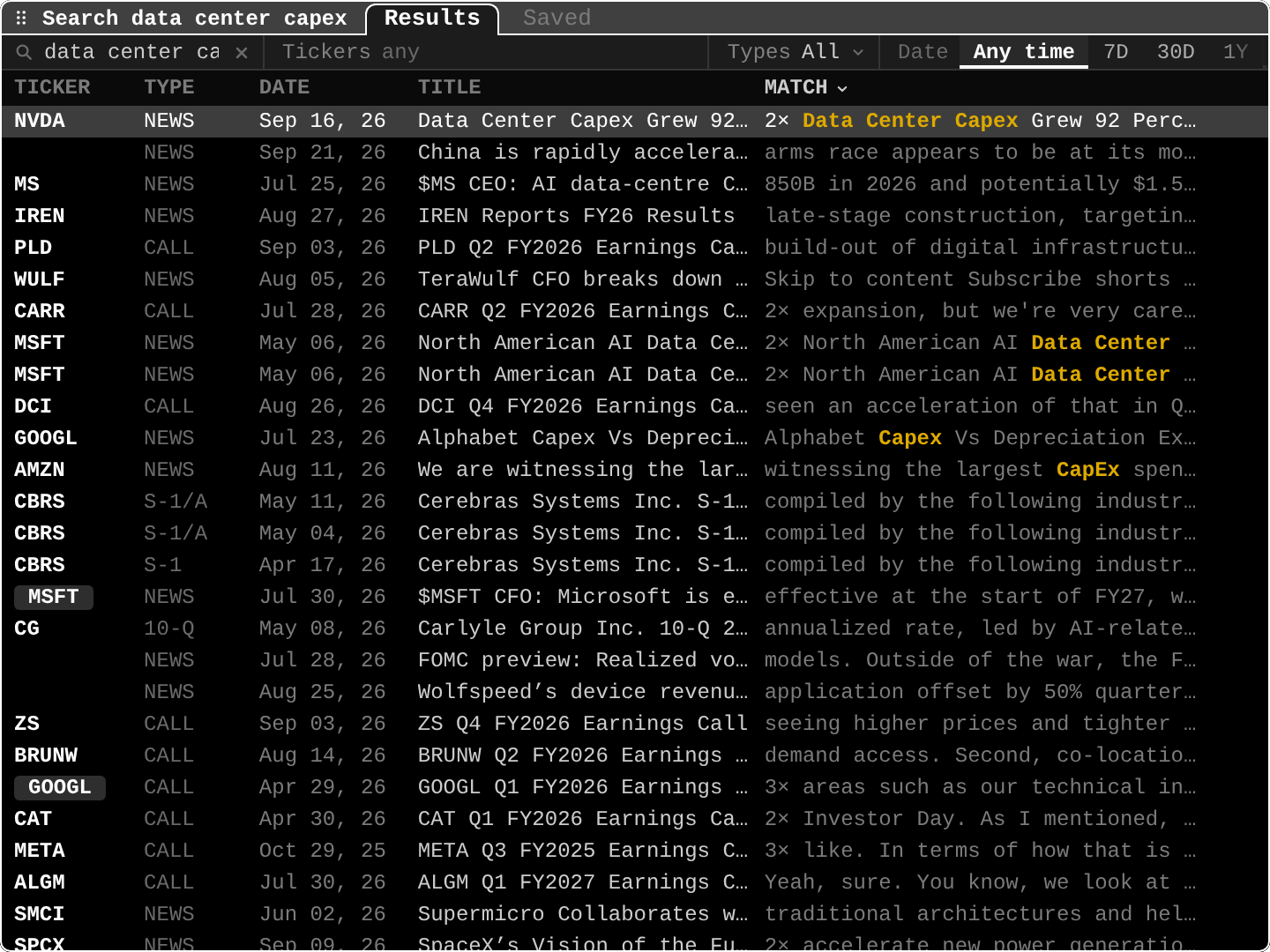
open ittype SRCH data center capex. Tabs: Results, Saved. Filters: Tickers, Types, Date (Any time, 7D, 30D, 1Y).
NVDA NEWS Sep 16, 26 Data Center Capex Grew 92... 2x: a news story with two matches, the phrase highlighted.PLD CALL Sep 03, 26: the phrase in Prologis's earnings call: a warehouse and data center landlord.CBRS S-1/A: the phrase in an IPO registration statement.CG 10-Q: the phrase in a quarterly report of an investment firm.- Rows with no ticker: general news not linked to a company.
Practice and recap
Try it3 tasks
- In the screenshot, name three document types that mention the phrase. (News, earnings calls, S-1/A, 10-Q.)
- How would you check whether a theme is new? (Compare match counts over different date windows.)
- Why search calls and not just news? (Calls show what management itself says, often before reporters write about it.)
Common mistakes4 mistakes
- Searching single common words and drowning in results.
- Counting mentions without reading them: "we see no pricing pressure" also matches.
- Forgetting that coverage starts at a certain date.
- Treating a rising mention count as a price signal by itself.
Check yourself3 questions
- What does full-text search look at?
- Why use quotes in a search?
- What does a saved search do?
Answers
- The words inside documents, not only titles.
- To match the exact phrase.
- It keeps the query and alerts you to new matches.
Words in this lesson4 words
- full-text search
- Searching the words inside documents.
- phrase search
- Matching an exact sequence of words, in quotes.
- match
- One place a search term appears.
- saved search
- A stored query that can alert on new matches.
Educational material about reading market data, not investment advice.