Free, Pro and how fresh your data is (UPGRADE, CONN)
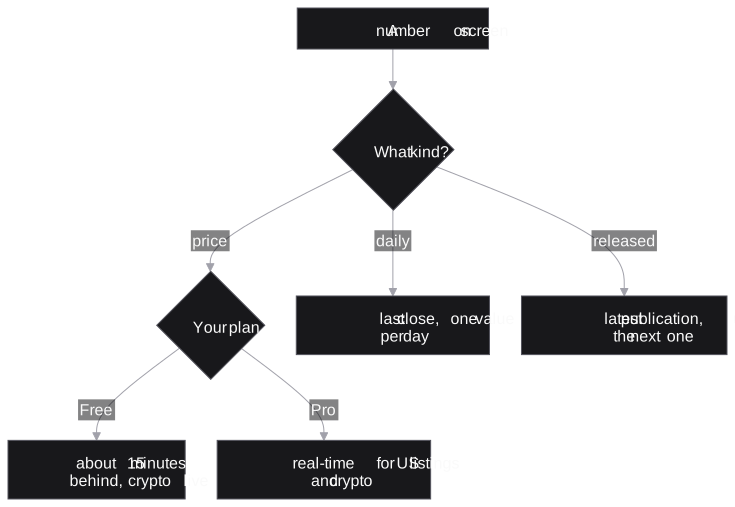
Every number has an age (real-time, 15 minutes behind, daily or on release), and the help card's Data line and the clock mark on a quote tell you which.
- 5 min
- 4 questions
- Lesson 7 of 9
Why you would care
You see AAPL at 335.91 and call your broker. The real price is 337: on the free plan, that quote was 15 minutes old. A 15-minute-old price is fine for research and useless for trading. Know which one you have.
The idea from scratch
Data does not all move at the same speed:
| Kind of data | How often it really changes | Example |
|---|---|---|
| Prices of stocks, options, FX | Many times per second while markets trade | a quote |
| Daily data | Once per day, after the close | a yield curve, a correlation |
| Released data | When a company or agency publishes | earnings, inflation, holdings |
| Event data | Whenever something happens | news, filings, halts |
"Fresh" means different things for each: a yield curve from last night is as fresh as it gets; a stock price from 15 minutes ago is stale for a trader.
The plans
Signed out
you can use the app; many market functions work with delayed data.
Free account (an email and a password)
adds sync across devices, chat, alerts by phone and email, and previews of some research datasets.
Pro (paid, with a 7-day free trial)
real-time US prices, real-time news, and the full research datasets.
What Pro changes, in one table
From the help cards' Data lines:
| Data | Free | Pro |
|---|---|---|
US stocks and ETFs (DES, QQ, GP, PF) | 15 minutes delayed | Real-time |
| Stocks on other exchanges | Delayed | Delayed |
| Crypto | Real-time | Real-time |
US options (OMON, OSA), trade tape (TAS) | 15 minutes delayed | Real-time |
News (N, TOP, CN) | 12 hours delayed | Real-time |
Filings, statements (FA, SEC, INS) | As filed | As filed |
Daily data (GC, CORR, VIX) | Daily | Daily |
Some functions are Pro only (for example RISK, EK, CALLS, JOBS, FLOW). Some need only a free account (SRCH searches calls, news and filings for any signed-in account; its alerts on new matches are Pro). Others show a preview on Free, usually three rows per section (KPIS, GUIDE, HIRE, CATL...), or the latest figure only (EXEC). A locked row in a table means "the rest is on Pro".
See it in Gloom

How to read freshness on screen:
AGE: how long ago this quote arrived.4hmeans four hours: the market was closed.- The clock mark (
◷4hon AAPL): this quote comes from a delayed feed. No mark: not delayed (a connected broker's quote, say). - The help card's Data line (
F1on any pane): the plan rule for that function. - Pane footers often say "as of" a date and time.
- Without Pro (signed out included), the status bar says it once for the whole app:
◷ 15m delayed(in the terminal, signed out:☁ Log in ◷15m delayed Feedback). Click it to start Pro. Each pane whose prices are late keeps a yellow clock in its footer (◷15min the terminal). The market at the right of the header never carries the mark: the status bar and the footers say it. Pro and trial accounts see none of this.
When the connection fails
Two notes tell you that what you see is not the latest answer:
saved copy from 14:37, first in a pane's footer: a refresh failed (no connection, a timeout, a busy server), so the pane shows the copy it saved at 14:37. Read every number in it as of 14:37.Can't reach the data servicein the status bar (Offlinein a narrow terminal): no answer at all. Click it to openCONN. The app keeps asking and reloads by itself once the service answers.
UPGRADE and CONN
UPGRADEopens the Pro checkout (or the billing page during a trial), signing you up first if needed.CONNlists every connection the app keeps, with its status and speed: is it the market or your connection?
Practice and recap
Try it3 tasks
- In the screenshot, which ticker shows a delayed quote? (AAPL, with the clock mark.)
- Using the table: on Free, how old is a news story when you first see it? (About 12 hours.)
- At 15:10, a footer reads
saved copy from 14:37. How old are its numbers? (33 minutes: they are from 14:37.)
Common mistakes4 mistakes
- Assuming Pro makes everything real-time. Daily and released data are the same on both plans.
- Trading off a delayed quote, or a saved copy.
- Thinking a frozen price is a bug. Check the session (OPEN or CLOSED) and
CONNfirst. - Reading a three-row preview as the whole dataset.
Check yourself4 questions
- On the free plan, how far behind are US stock quotes? And crypto?
- What does the clock mark before an age mean?
- Name one function that is Pro only.
- Where does Gloom say, once, that your prices are 15 minutes behind?
Answers
- About 15 minutes; crypto is real-time.
- That quote comes from a delayed feed.
- Any of
RISK,EK,CALLS,JOBS,FLOW. - In the status bar:
◷ 15m delayed, which also starts Pro when clicked.
Words in this lesson4 words
- fresh / stale
- Recent enough for its purpose / too old for it.
- delayed
- Shown a fixed time after it happened.
- preview
- The first rows of a Pro dataset, shown on Free.
- Pro
- The paid plan: real-time US prices and news, full datasets.
Educational material about reading market data, not investment advice.