Getting help (HELP, F1, CHG, FB)
HELP opens the guide and every function, and F1 opens the help card of the pane in front of you, including how fresh its data is on your plan.
- 4 min
- 3 questions
- Lesson 6 of 9
Why you would care
What does this screen do, and how fresh is it? You will meet a screen you do not understand at the worst moment. You do not need to remember 150 codes, only one key:
F1. The help card also answers the most important question about any number on screen: is it live, or behind?
The idea from scratch
Gloom has two levels of help:
The Help pane (
HELP)a guide with tabs, the full list of functions, every keyboard shortcut, and a way to send feedback.
Help cards
one small card per function.
F1opens the card of the focused pane.HELP OMONopens the card ofOMONwithout openingOMONitself.
What a help card contains
| Line | What it tells you |
|---|---|
| Summary | One or two sentences: what the function answers, when to reach for it |
| Usage | How to type it, with a real example (OMON AAPL) |
| Keys | The two to four keys that matter in its pane |
| Data | How fresh the data is, on Free and on Pro; your current plan is highlighted |
| Bloomberg | The Bloomberg Terminal function it stands in for, if there is one |
| Docs | A link to its page in the online docs |
The Data line uses a few standard phrases:
- "Real-time": as it happens.
- "15 minutes delayed": the free plan for US stocks and options.
- "Daily closes": one number per day, after the close.
- "On release": updated when an agency or company publishes, like an inflation report.
- "As filed with the SEC": from company filings.
- "Pro only": nothing on the free plan except the upgrade.

See it in Gloom
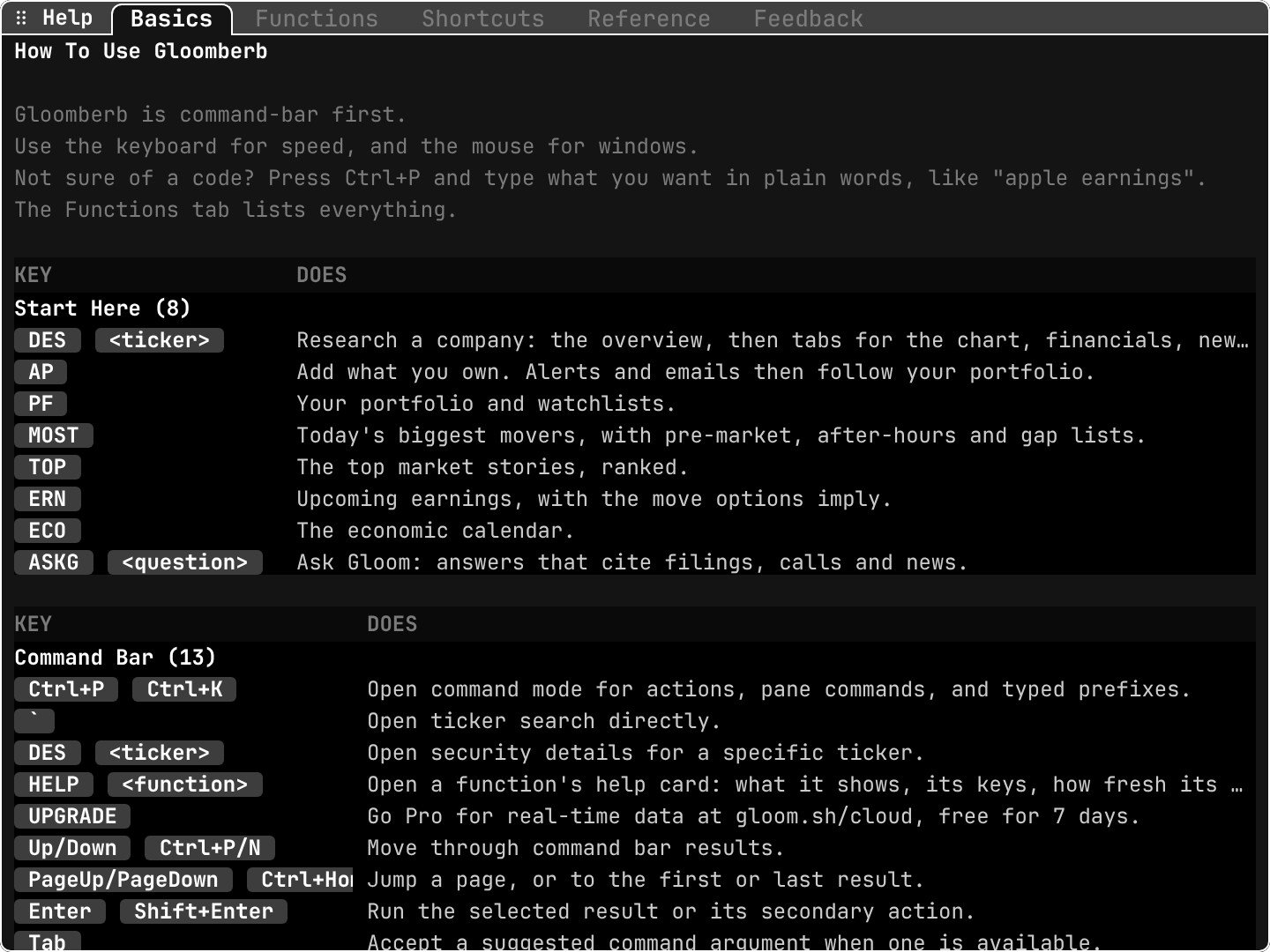
open ittype HELP. For one function, type HELP OMON or press F1 on its pane.
- The tabs on top:
Basics,Functions,Shortcuts,Reference,Feedback.handlmove between them. Start Here (8): the eight functions to learn first, each with one line:DES,AP,PF,MOST,TOP,ERN,ECO,ASKG.Command Bar (13): the keys of the command bar, such asCtrl+P, the backtick for ticker search, andHELP <function>.UPGRADE: listed with the command bar keys; it opens the Pro checkout.
The other tabs
Functions
every function code, with its name. Press
Enteron one to open the command bar with that code typed.Shortcuts
every key. Press
Enteron a row to change it to the key you prefer,xto unbind,0to restore the default.Feedback
send a message to the team.
FBopens the same thing from anywhere (also typedFEEDBACKorBUG). It can attach a screenshot and scrubbed logs, and works even when you are signed out.
What changed: CHG
CHG opens the changelog: the version history and release notes, inside the app. Useful after an update, to see what is new.
Practice and recap
Try it3 tasks
- Open
HELPand read the eight Start Here lines. Which one would you use to see the day's biggest movers? (MOST.) - Type
HELP DESand find its Data line. What does the free plan get? (15 minutes delayed, crypto real-time.) - Press
F1on any pane you have open and read its keys.
Common mistakes4 mistakes
- Guessing what a number means instead of pressing
F1. - Ignoring the Data line and treating a delayed price as live.
- Searching the web for a key. The Shortcuts tab lists all of them, and lets you change them.
- Reporting a bug without a screenshot.
FBcan attach one for you.
Check yourself3 questions
- What is the difference between
HELPandF1? - Which line of a help card tells you whether the data is live?
- Which code opens the release notes?
Answers
HELPopens the whole Help pane;F1opens the help card of the focused pane only.- The Data line, with one value for Free and one for Pro.
CHG.
Words in this lesson5 words
- help card
- A short card per function: summary, usage, keys, data freshness, Bloomberg equivalent, docs link.
- Data line
- The help card line that says how fresh the data is on Free and on Pro.
- real-time
- Shown as it happens.
- delayed
- Shown a fixed time after it happened, like 15 minutes.
- changelog
- The list of changes in each version of the app.
Educational material about reading market data, not investment advice.