Layouts and desks (LAY, DESK)
A layout is a saved screen of panes, DESK adds a ready-made one for a kind of market, and LAY switches, adds and shares layouts.
- 5 min
- 3 questions
- Lesson 5 of 9
Why you would care
How do you get a good screen without building it pane by pane? Traders do not open twelve panes every morning. They switch between a few saved screens: one for stocks, one for options, one for the economy. In Gloom those screens are layouts. Six of them are ready-made, and any layout you like can be shared as a link.
The idea from scratch
A layout is an arrangement of panes, with their tickers, settings and links, saved under a name. Each layout is a tab in the bar at the bottom of the screen. Click a tab, or use the layout actions (Ctrl+Shift+L), to switch.
A desk is a ready-made layout built for one job, like a bank's trading desk. DESK alone opens the list; DESK options adds that desk directly as a new tab.
The six desks
DESK name | Panes it opens | Linked panes |
|---|---|---|
| Equities | DES, G, FA on your company, ERN, TOP, EQS | the chart and financials follow the overview |
| Options | OMON SPY, OPX, OVDV, HIVG, VOLS (and FLOW on Pro) | positioning, surface and IV history follow the chain |
| Futures & commodities | FUT, a crude oil chart, CTM CL, COT CL, SEAS | seasonality follows the chart |
| Rates & credit | WIRP, GC, BTMM, CDX, SOVR, CBR | none |
| FX & macro | FXC, WEI, world yield curves, ECO, ECST, CBR | none |
| Active trading | GIP SPY with VWAP, a quote board, TAS, MOST, HALT, N | the tape follows the chart |
"Your company" is the first stock you hold, or AAPL if you have none yet. Each pane in this table has its own lesson later in the Academy.

LAY: the layout browser
LAY opens a browser of your saved layouts and, under Discover, of published layouts (ones that people shared; browsing them needs a free sign-in). From there you can:
oopen a layout (switch to it),aadd one to your workspace as a new tab,nstart a new one,/search.
Publishing a layout copies a link (term.gloom.sh/l/...) that anyone can open. It keeps the portable parts: panes, searches, chart zoom and drawings. Your accounts, portfolios, keys and any field marked private stay on your machine.
See it in Gloom
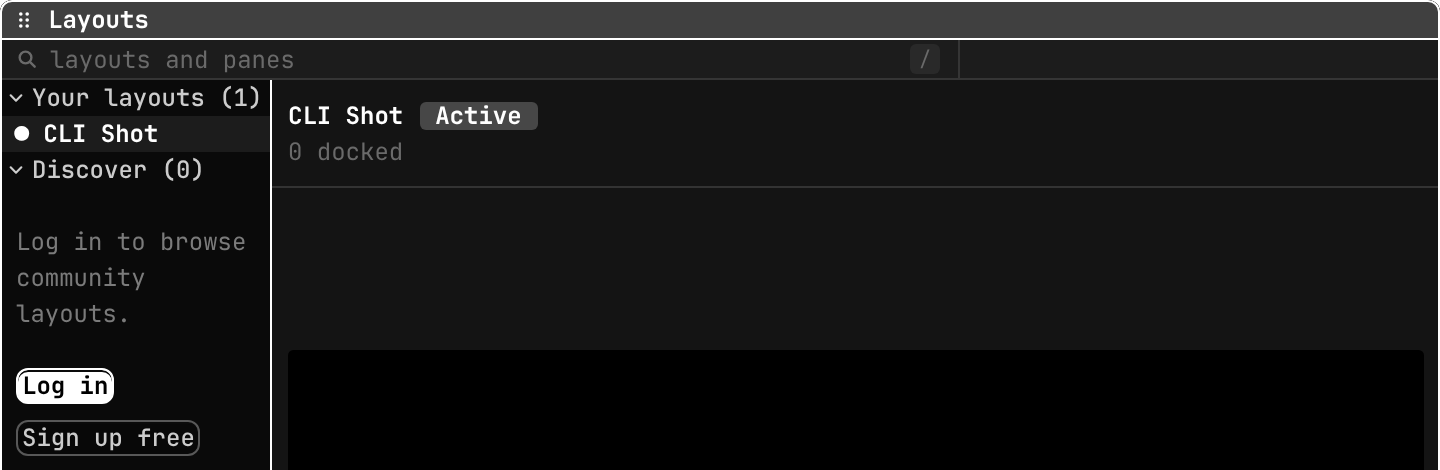
open ittype LAY, or DESK for the desk list.
Your layouts (1): the layouts in your workspace. The dot and theActivebadge mark the one on screen.Discover: layouts other people published. Signed out, it asks you to log in.- The search box on top (
/) searches layouts and panes. - The right side shows the selected layout: its name and how many panes are docked in it.
- Not in the picture: the tabs at the very bottom of the screen, one per layout in your workspace.
Practice and recap
Try it3 tasks
- Type
DESK options. A new tab appears at the bottom. Change the ticker in the options chain and watch the linked panes follow. - Type
DESKalone and read the list of desks. - Open
LAYand find the layout you are on.
Common mistakes4 mistakes
- Building a big screen pane by pane on day one. Start from a desk and change it.
- Expecting a published layout to share your portfolio. It never does: private data stays local.
- Forgetting that linked panes follow their leader. Change the ticker in the leading pane, not in each one.
- Opening ten desks. Two or three tabs you really use beat ten you never look at.
Check yourself3 questions
- What is the difference between a layout and a desk?
- What does
DESK ratesadd? - Which parts of a layout does publishing leave out?
Answers
- A layout is any saved arrangement of panes; a desk is a ready-made layout for one kind of market.
- A "Rates" tab with the rate path, the yield curve, money markets, index CDS, sovereign CDS and central bank rates.
- Credentials, accounts, portfolios and pane fields marked private.
Words in this lesson4 words
- layout
- A saved arrangement of panes, shown as a tab at the bottom.
- desk
- A ready-made layout for one kind of market (equities, options...).
- published layout
- A layout shared as a link that anyone can open.
- linked pane
- A pane that follows the ticker of another pane or list.
Educational material about reading market data, not investment advice.