Panes, focus and linking (WIN, GL, PS, LMA)
Every function opens in a pane, one pane at a time has the focus and receives your keys, and panes can be moved, tidied and linked so they follow a list.
- 4 min
- 3 questions
- Lesson 4 of 9
Why you would care
How do you control what is on your screen? After ten commands your screen is full of rectangles. Which one is listening to your keys? How do you make the chart follow whatever you click in your watchlist? Five keys and one idea (focus) answer all of that.
The idea from scratch
A pane is one rectangle showing one function. Panes come in two kinds:
Docked
tiled into the grid of the layout, side by side, no overlap.
Floating
a window on top, which you can move and resize freely.
Exactly one pane has the focus: its border is highlighted and it receives your keys. Press Tab to move focus to the next pane, or click a pane.
Many panes have tabs across the top (Overview, Financials, Chart...). h and l switch tabs, like left and right.
Linking: panes that follow a list
A pane that shows one ticker, like a chart (GP), options (OMON, OPX), financials (FA) or news (CN), can link to a watchlist or portfolio. Then, when you move the selection in the list, the linked pane switches to that ticker.

To link: open the pane's menu and choose Link to and the list's name. The title then says, for example, OPX NVDA ⧉ Linked to Watchlist. Unlink from keeps the ticker it shows.
See it in Gloom
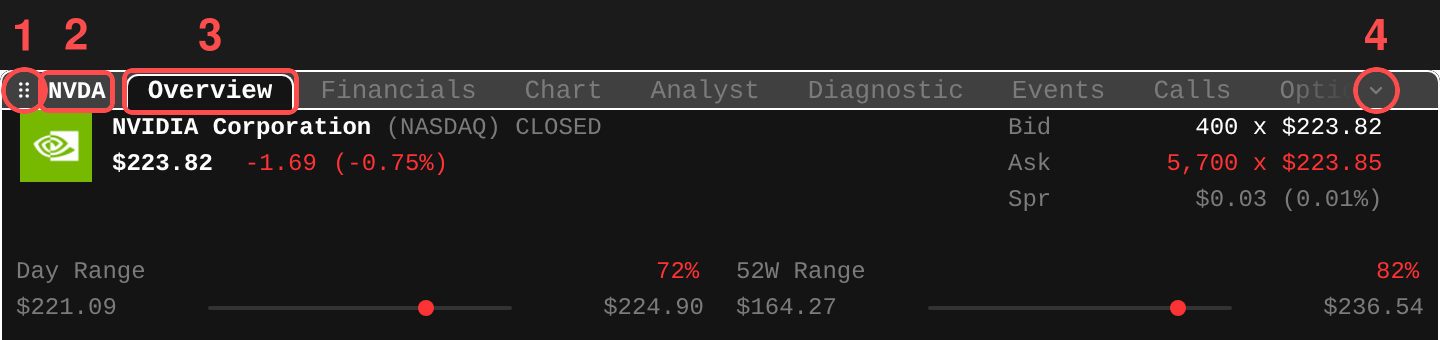
The numbered parts:
- The handle (dots): grab it with the mouse to move the pane.
- The pane's subject, here
NVDA. - The tabs. The highlighted one,
Overview, is open;handlmove left and right. - The arrow: more tabs that do not fit.
The keys that control panes (desktop and terminal):
| Key or command | What it does |
|---|---|
Tab | Move focus to the next pane |
. (or the ... button) | Open the focused pane's menu: every action it offers, plus Link to |
Ctrl+, or PS | Open the focused pane's settings |
Ctrl+W | Close the focused pane (unless it is locked) |
Ctrl+Shift+D | Dock or float the focused pane |
Ctrl+Shift+M or WIN move | Move the focused window with the keyboard |
WIN resize | Resize it with the keyboard |
Ctrl+Shift+G or GL | Tidy: arrange every open window into one tiled layout |
Ctrl+Shift+E | Export the focused pane's table as a CSV file |
LMA | Layout and pane actions: float, dock, swap, remove, save |
On the desktop app, Cmd/Ctrl+Shift+O pops a pane out into its own window, and Cmd/Ctrl+Shift+C copies a screenshot of the focused pane.
The footer tells you the rest
The focused pane's footer lists its own keys, written like [a]dd or [e]xpiry: press the letter in brackets. If the footer is too narrow, the pane menu (.) lists them all.
Practice and recap
Try it3 tasks
- In the app, open
DES NVDAandGP NVDA. PressTaba few times and watch the highlighted border move. - Open
PF, then aGPchart. In the chart's menu (.), choose Link to your watchlist. Move up and down the list. - Press
Ctrl+Shift+Don the chart to float it, thenGLto tidy everything back.
Common mistakes4 mistakes
- Typing a letter key while the wrong pane has focus. Check the highlighted border first.
- Looking for buttons. Every action is a key in the footer or in the pane menu (
.). - Closing a linked pane when you meant to unlink it. Use Unlink from.
- Forgetting
GLexists after floating windows everywhere.
Check yourself3 questions
- What is the difference between a docked and a floating pane?
- How do you make a chart follow your watchlist selection?
- Which key opens the focused pane's menu?
Answers
- Docked panes tile the screen without overlap; floating panes sit on top and can be moved anywhere.
- In the chart's pane menu, choose Link to and the watchlist's name.
.(period), or the...button.
Words in this lesson7 words
- pane
- One rectangle showing one function.
- focus
- The pane that receives your keys; its border is highlighted.
- docked / floating
- Tiled into the grid / a movable window on top.
- tab (in a pane)
- One view inside a pane, switched with
handl. - link
- Make a pane follow the selection of a watchlist or portfolio.
- pane menu
- The list of every action a pane offers, opened with
.. - footer
- The bottom line of a pane, listing its keys like
[a]dd.
Educational material about reading market data, not investment advice.